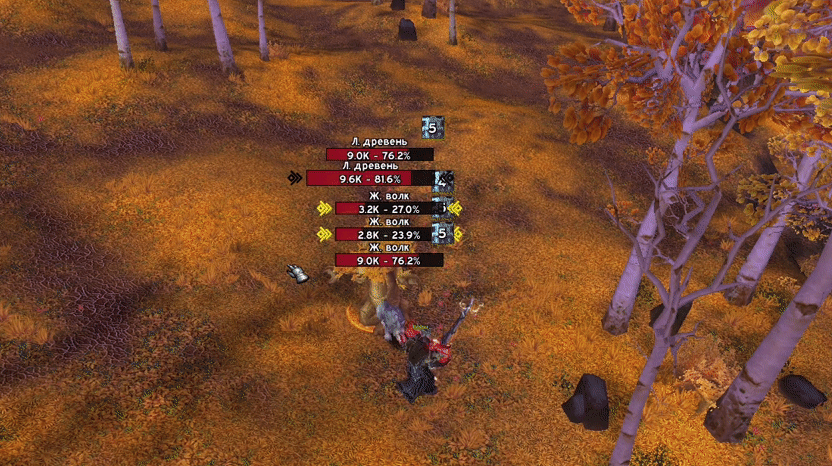
Advanced [Misc][Nameplates] WeakAura — Features and Notes
An enhanced nameplate WeakAura ([Misc][Nameplates]) with several useful options and fixes.
Main features
- Works out of combat. Closing/adjusting other UI elements only happens when the hitbox changes in combat (for example, when new nameplates appear).
- Supports FRIENDLY nameplates: they are ignored when stacking, and their hitbox can be made non-clickable.
- Configurable start position for shields so they can be positioned further from the model.
- Displays nameplates for very large boss models that would normally extend beyond the top edge of the screen.
- Upper-screen-edge limit: a configurable cap so nameplates will not "fly off" past the top of the screen.
- Option to hide nameplates while under the control of Lady Deathwhisper to avoid visual annoyance.
- Blacklist option: add NPCs to a blacklist by name so they will not stack (for example, the dragonlings on Sindragosa's trash).
Mouse/targeting helpers (ElvUI specific)
- AutoMouseOver (ElvUI only): when a nameplate with a name appears, it is automatically moved under the cursor so ElvUI can assign it a GUID. This means you no longer need to manually target or MouseOver for buffs/debuffs to display correctly. Note: if you are running while holding the mouse cursor, the cursor will be FORCIBLY unlocked, which may be inconvenient.
- Freeze MouseOver: when hovering over a nameplate, the plate is held in place EVEN if the NPC is moving (useful for better highlighting).
Important: to avoid problems, only one of the two options above (AutoMouseOver or Freeze MouseOver) should be active at a time.
Warnings / Compatibility
This WeakAura will break or conflict if any of the following are enabled — disable them before using this WeakAura:
- Aura [Misc][Nameplates] — disable it.
- Aura [Misc][EnemyGrid] — disable it.
- Addon VirtualPlate — disable it.
Installation
Copy the import string, open WeakAuras in game, choose Import, paste the string and confirm the import.