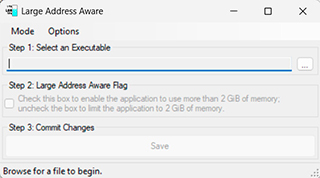
Large Address Aware is a Windows executable flag that allows a 32-bit application such as the WotLK 3.3.5a client to address more virtual memory on 64-bit Windows.
Before you change the client
- Back up Wow.exe before modifying it.
- Apply the flag only to the exact client executable you use.
- If a launcher replaces or verifies Wow.exe, the change may be reverted.
- LAA does not magically improve FPS; its main purpose is reducing address-space pressure and some out-of-memory crashes.
Safe installation workflow
- Close World of Warcraft.
- Make a copy of every file that will be replaced or edited.
- Apply only the files for your exact 3.3.5a client build.
- Start the client and test the login screen, character selection and a short in-game session.
- If you see crashes, missing textures or UI errors, restore the backup before adding any other patch.
Client patches are different from normal AddOns. They can modify executable flags, interface art or game data files, so a mistake can prevent the client from starting. Keep the original files permanently and document the exact package version you publish on WotLKHelper.
After installation, test more than the login screen. Enter the world, open the main interface panels and spend a few minutes in a normal zone. If the patch changes graphics, inspect several spell icons or UI states. If it changes the executable, monitor stability during a longer session. Do not combine several client patches at once when troubleshooting, because that makes it difficult to identify which file caused the problem.