Ackis Recipe List is a profession addon for WoW WotLK 3.3.5a that helps you find recipes your character has not learned yet.
Instead of manually checking trainers, vendors, drops, and other sources, the addon scans your current profession and creates a list of missing recipes together with information about how they can be obtained.
How to use Ackis Recipe List
Open one of your profession windows, such as Alchemy, Blacksmithing, Enchanting, Engineering, or Tailoring.
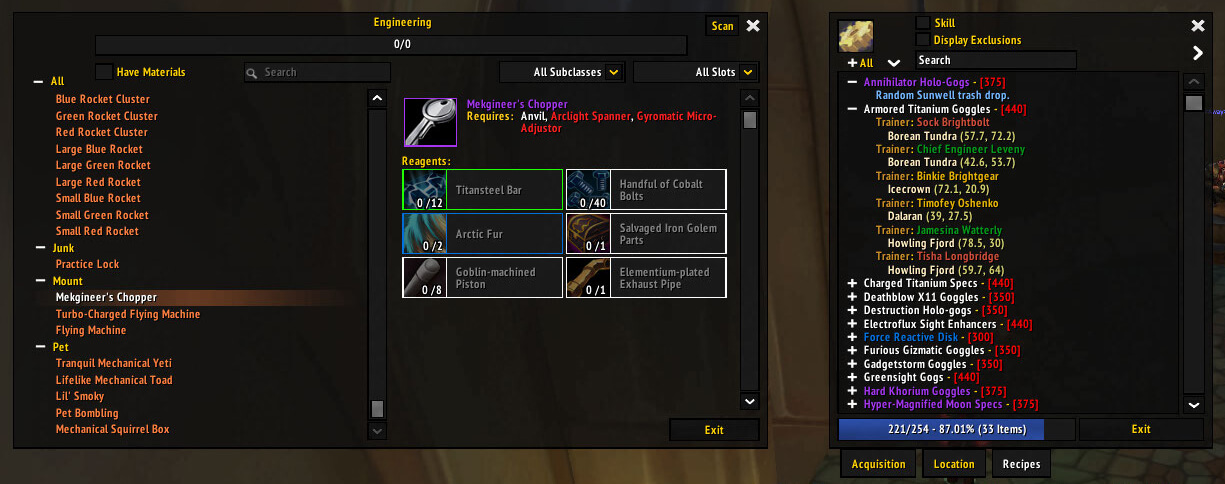
Ackis Recipe List adds a Scan button to the profession window. Click it to scan your known recipes and display the recipes you are still missing.
The addon can show acquisition information for recipes, helping you determine whether a missing recipe comes from a trainer, vendor, drop, or another source.
It works with all trade skills, including Runeforging.
Configuration
To open the addon configuration, type:
/arl
Useful commands include:
/arl scan profession
Scans a profession.
/arl sort
Opens the sorting options.
/arl display
Opens display settings.
/arl profile
Opens profile options.
You can also filter and sort the recipe list to make it easier to focus on the recipes you actually want to collect.
Installation
- Download the Ackis Recipe List archive.
- Close World of Warcraft.
- Extract the addon into World of Warcraft\Interface\AddOns.
- Start the game and make sure Ackis Recipe List is enabled.
- Open a profession window and click Scan.
Ackis Recipe List is especially useful for completionists and profession players who want a quick overview of which recipes they are missing and where to look for them.