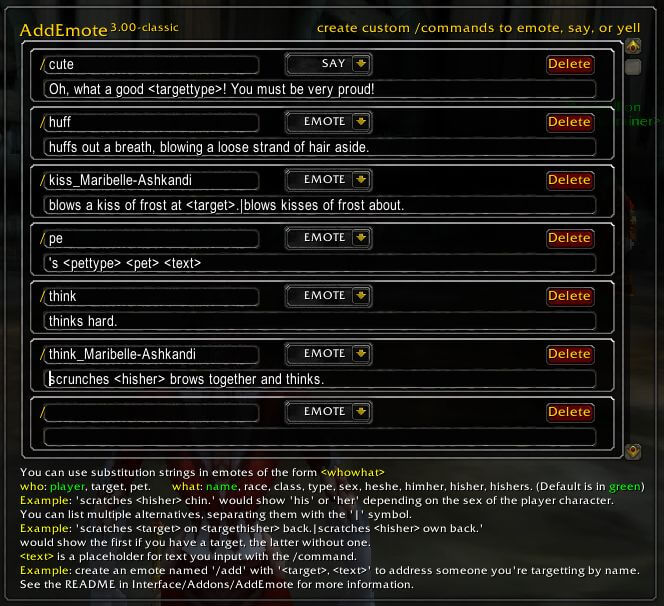
Add Emote is a utility for creating custom slash-command emotes that send reusable text to chat or emote channels.
Main features
- custom /command style emotes.
- saved reusable text.
- useful for roleplay, raid announcements or social messages.
- simple configuration interface depending on build.
How to use
Create a short custom command, test it in a private or low-traffic channel, and avoid names that conflict with existing WoW slash commands.
Creating a custom emote
AddEmote stores character emotes in AddEmote_CharacterEmotes and lets the player create emote text for a specific character. The archive documentation describes global and party emotes. Open the addon interface, enter the text for the emote and save it, then use the generated emote through the normal chat/emote workflow. The result is chat text, not a combat action or a server-side animation.
Keep the wording appropriate for the channel and remember that other clients may not have the addon, so they receive the emitted text rather than a new animation. Character-specific storage means another character does not automatically have the same custom list.
Save separate emotes for repeated character actions and keep the text short enough for the destination channel. Because the data is character-specific, verify the active character before editing the list.
Use the saved character list as a role-play tool: create an emote, trigger it through the normal emote command, and edit the entry if the text is too long for the selected channel. It does not alter combat or unit animations.
An emote can be edited or removed from the character list without changing ordinary Blizzard emotes. The package is a text helper, so its visible result depends on the chat channel and the text other clients receive.