Action Bar Saver is a profile addon that saves and restores the contents of your action bars, including spells, macros and items.
Main features
- named action-bar profiles.
- quick restore after respecs.
- saves spell, item and macro placements.
- useful backup before UI changes.
How to use
Set up your bars, save a named profile, make a small change, then test the restore command before relying on the profile for a full respec.
Saving and restoring bars
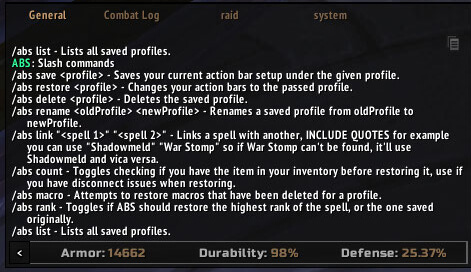
Action Bar Saver 2 stores the current action-bar layout and restores it later. The Interface 30300 package saves profiles in ActionBarSaverDB and registers the slash commands /actionbarsaver and /abs. A profile is a snapshot of action slots, so it is useful when a character changes between a raid layout, a PvP layout and a leveling layout.
Open the addon command interface, create a named profile while the desired bars are active, then load that profile after changing spec or bar setup. Check the restored bars before combat: macros, spells that changed rank and items that no longer exist can leave an empty or altered slot. The addon restores action-bar data; it does not rewrite the macro body, change keybindings or bypass protected action-bar updates during combat. Save a profile after deliberately changing a bar instead of relying on an old snapshot.
Use different profile names for genuinely different layouts and load them after the correct action-bar page is active. If a spell is missing after a restore, inspect the slot and macro separately: Action Bar Saver can restore the slot reference, but it cannot create a spell that the character has not learned or repair a macro that exceeded the client’s limits.
Keep the profile name meaningful and reload it only when the intended layout is active. Empty slots after a restore usually indicate a missing spell or changed macro, not a failure to save the profile.