
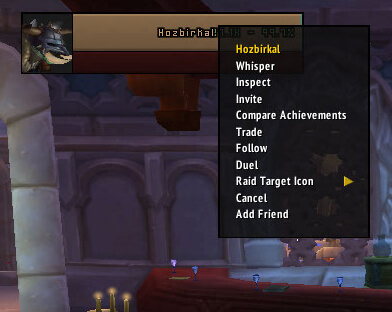
AddFriend is a lightweight quality-of-life addon that expands the default player right-click menu with additional friend and guild management options.
Instead of opening the Friends or Guild window, you can manage players directly from unit frames, chat names, and other player context menus.
What AddFriend does
The addon adds context-menu options such as:
- Add Friend
- Remove Friend
- Guild Invite
- Guild Remove
AddFriend checks whether the selected player is already on your friends list and shows the appropriate option. For guild actions, it can also determine whether the player is already in your guild.
Guild Invite and Guild Remove are only available when your character has the required guild permissions.
The addon also performs hostility checks and works with multiple unit-frame interfaces.
How to use AddFriend
Right-click another player's portrait or name and select the appropriate option from the menu.
AddFriend can work with player context menus from places such as:
- Target, party, and raid frames
- Chat
- Who window
- Guild window
- Friends list
There are no special commands required for normal use.
Installation
- Download the AddFriend archive.
- Close World of Warcraft.
- Extract the addon folder into World of Warcraft\Interface\AddOns.
- Start the game and make sure AddFriend is enabled in the AddOns menu.
If the additional menu entries do not appear, check that the addon is enabled and that the selected player is eligible for the requested action.
AddFriend is a simple addon, but it saves a few clicks whenever you frequently manage friends or guild members.
Before you install
Keep a copy of your current addon folder and saved settings before replacing files. Confirm that the extracted folder is intended for the 3.3.5a client, enable it on the character-selection screen, and test the main feature outside important group content. If the interface behaves unexpectedly, disable unrelated addons temporarily and reload the UI.



