
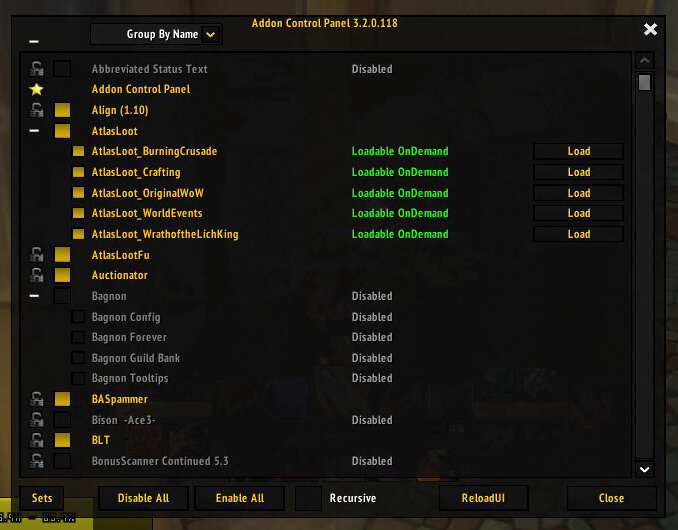
ACP 3.2.0.118 adds an Addons panel to the in-game menu for enabling and disabling addons without returning to character select. Its Interface 30300 TOC supports multipart addons and stores ACP_Data.
Using it
Open the Addons entry, treat suite components and libraries as groups, and reload when requested. Load-on-demand addons may still need the normal WoW flow; ACP does not repair incompatible Lua.
Addon load management
Open ACP from the in-game menu to enable or disable addons without returning to character selection. Its list supports multipart suites, so treat a core addon and its libraries as one group. ACP can request a reload after a load-state change and stores its data in ACP_Data. It does not repair incompatible Lua or missing dependencies, and load-on-demand Blizzard modules may still follow normal client rules. This is the Interface 30300 version 3.2.0.118 package.
Managing multipart addons
ACP's Addons panel groups addon folders and libraries so a player can see which components belong together. Open the panel from the in-game menu, expand a suite, and enable or disable the group rather than switching off a library that another module needs. ACP can request a reload after a change, allowing the new load state to apply without returning to character selection.
Use ACP when testing a UI setup: disable one complete frame replacement, reload, and compare the result with the replacement enabled. Load-on-demand entries may still follow WoW's normal loading rules, and ACP cannot make an addon built for another API compatible. If a module reports a missing dependency, restore the dependency group instead of repeatedly reloading.
ACP 3.2.0.118 targets Interface 30300 and stores ACP_Data. It is an addon load manager, not a Lua error repair tool or an alternative to the character-selection addon list for protected Blizzard components.



