
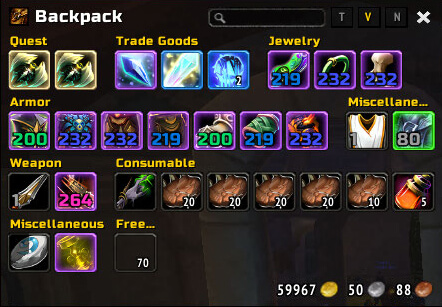
AdiBags is a smart inventory replacement that combines bags into one window and automatically groups items into useful categories.
Main features
- single bag window.
- automatic categories for equipment, consumables, trade goods and more.
- search and new-item highlighting.
- custom filters.
How to use
Open your bags normally, then use /adibags to adjust categories and filters. Create custom rules only for items that repeatedly end up in the wrong section.
Filters and virtual bag groups
AdiBags 3.3.5 aggregates the character’s bags into one virtual view and places items into filter-driven sections. The supplied TOC identifies it as the Sattva WotLK 3.3.5 build and lists modules such as AdiBags_Bound plus optional libraries and plugins. Its database is AdiBagsDB.
Open the AdiBags configuration to enable or disable filters and change the order or layout of the displayed sections. A filter decides which group an item belongs to; this is different from physically moving the item between bags. The Bound module adds BoE/Soulbound filtering, while plugins such as Scrap, Masque or profession-related modules are optional and only work when installed. Use the bank view to sort and search stored items, then test a custom filter with one known item before assigning a broad category. AdiBags changes the presentation of inventory and bank data; it does not create extra bag slots.
Making filters useful
AdiBags becomes practical when broad default filters are adjusted to the player inventory. Keep quest items, consumables, equipment and trade materials in separate visible sections, then put the Bound filter or a plugin section where it can be found quickly. A filter changes the virtual group only; it does not move the physical item to another bag. Bank and character views are separate data sources, so an item seen in a saved character view is not automatically available to the current character.



