
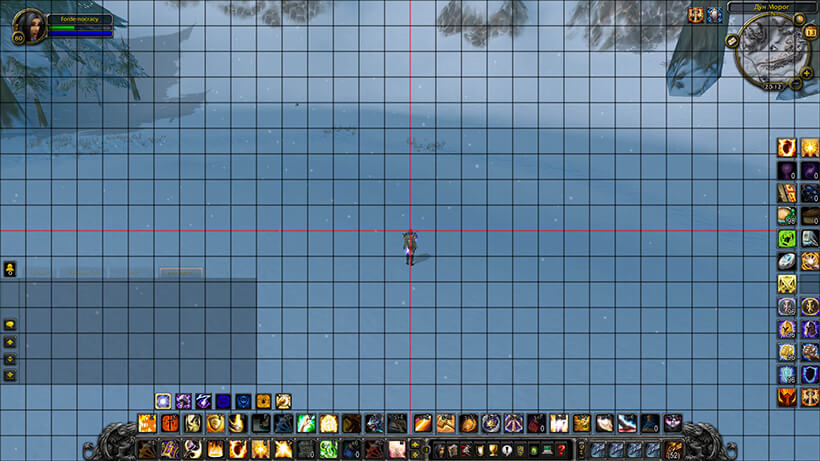
The production archive is Align version 1.10 by Akeru. Its TOC declares Interface: 50001, not the WotLK 3.3.5a interface number 30300, so this attached build should not be treated as a verified 3.3.5a-specific release. The code itself is small and has one purpose: draw a temporary alignment grid over the game screen.
What Align shows
When the grid is visible, black guide lines cover the screen and red guide lines mark the horizontal and vertical centre axes. The grid is calculated from the current screen dimensions and is attached to the full UI parent, so it gives a stable visual reference while the player moves frames with the normal Blizzard UI controls. It does not move, snap, or anchor action bars, unit frames, or other elements automatically.
Grid size and commands
Use /align to show the grid and use the same command again to hide it. An optional numeric argument selects the spacing: for example, /align 64 requests a 64-unit grid. The code rounds the value up to a multiple of 32 and limits it to 256; with no argument the default is 32. The argument is applied when the grid is shown. There is no confirmed command or setting for transparency, line thickness, colour, custom axes, or independent horizontal and vertical spacing. The line opacity is fixed in the Lua code.
Practical use
Enable the overlay, choose a spacing that makes the intended layout easy to compare, and use the centre axes to check symmetry while positioning frames through the game's own UI options. After the bars or frames are aligned, run /align again to remove the overlay. Align has no saved profiles or persistent layout database; it is a temporary visual guide.
Installation
Place the supplied Align folder containing Align.toc directly in World of Warcraft\Interface\AddOns. Because the archive declares Interface 50001, verify client compatibility before relying on it in a 3.3.5a installation.



