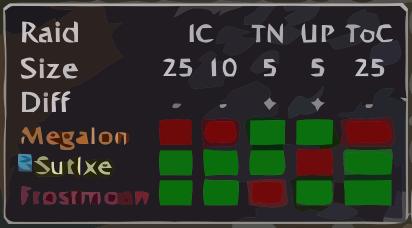
The production archive is Ailo (Am I locked out?) version 1.0.35 by Starfox, with Interface 30300. Ailo reads the current character's Blizzard saved-instance information and presents a compact lockout overview for the realm's characters. It is an information display, not a raid-progress or boss-kill tracker.
What the tooltip shows
Ailo builds a LibQTip table with instance name, group size and difficulty columns. Locked entries are stored with the character and realm, and the table uses separate colors for saved and free instances. The difficulty column distinguishes heroic from non-heroic data using configurable abbreviations. Five-man instances can be shown or hidden; the default profile focuses on raid entries. The addon does not display boss-by-boss kills or a numeric encounter progress state.
When the saved-instance API returns a reset duration, Ailo stores the expiration internally and removes old lockouts after they expire. The tooltip is a status grid rather than a confirmed countdown or reset-clock display: the source does not render an exact remaining-time value for each row.
Characters and daily information
Ailo uses the global AiloDB saved variable to keep data by realm and character, so it can show multiple characters that have logged in and refreshed their data. This is alt tracking, not account-wide live synchronization; each character must be logged in so the addon can request that character's current saved instances. Optional columns can mark whether a character has completed the Daily Heroic or Weekly Raid. The source also contains optional daily PvP and Wintergrasp-victory indicators.
Practical use and settings
Hover the Ailo minimap icon to inspect the grid before joining a raid or dungeon group. A saved cell identifies the character as locked to that instance and difficulty, while a free-colored cell indicates no stored lockout. Shift-clicking the icon manually refreshes the current character's information, and right-clicking opens the configuration panel. Settings control the minimap button, five-man visibility, all-character display, realm headers, daily and weekly columns, saved/free colors, and instance abbreviations.
Installation
Install the supplied Ailo folder directly under World of Warcraft\Interface\AddOns. The archive bundles its Ace3, LibQTip, LibDataBroker and LibDBIcon libraries.