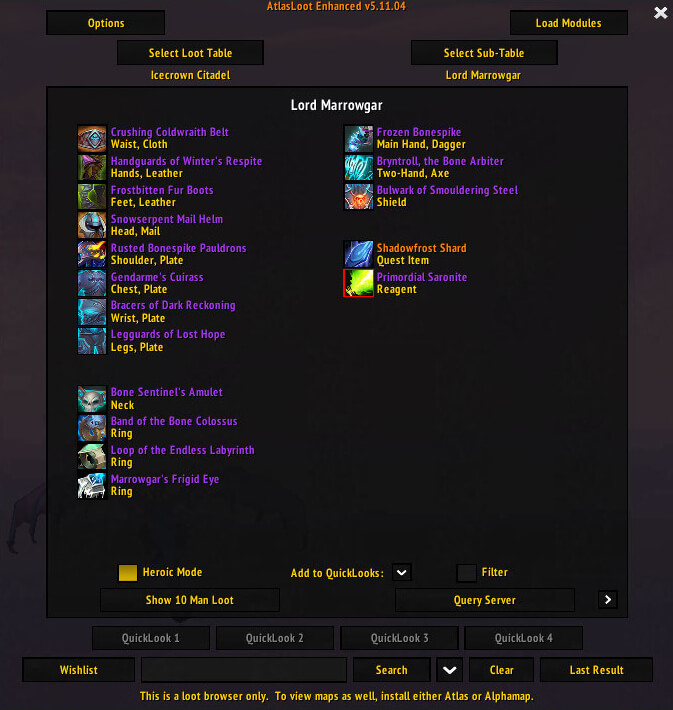
AtlasLoot is an in-game loot browser for boss drops, dungeons, raids, factions, PvP rewards, crafting and collections. It is useful when you want this information or control available inside the game without adding an unnecessarily large UI package. The goal is to make a specific WotLK 3.3.5a task quicker and easier to read while leaving the rest of the interface largely unchanged.
Main features
- raid and dungeon loot tables.
- item tooltips and drop sources.
- tier, reputation, profession and PvP collections.
- minimap and command access.
- search and favorites in supported builds.
How to use
Open /al, choose the instance or collection, and browse the boss or vendor before your run. Treat displayed drop chances as reference data that can differ on custom servers.
Useful commands in the supported build include:
/al/atlasloot/atlasloot options/atlasloot reset/atlasloot mmb
Installation
- Download the addon archive for your WotLK 3.3.5a client.
- Close World of Warcraft before replacing addon files.
- Extract the addon folder into World of Warcraft\Interface\AddOns.
- Start the game and make sure the addon is enabled on the character-selection screen.
- Test its basic function in a safe situation before using it in a raid, arena, Auction House session, or other important activity.
If AtlasLoot does not appear to work, first check for an extra nested folder inside AddOns and confirm that you downloaded a build intended for the 3.3.5a API. Old WotLK addons often have several forks, so commands and optional modules can differ slightly between packages. Keep a backup of a working addon folder before replacing it with another fork.
Best in Slot