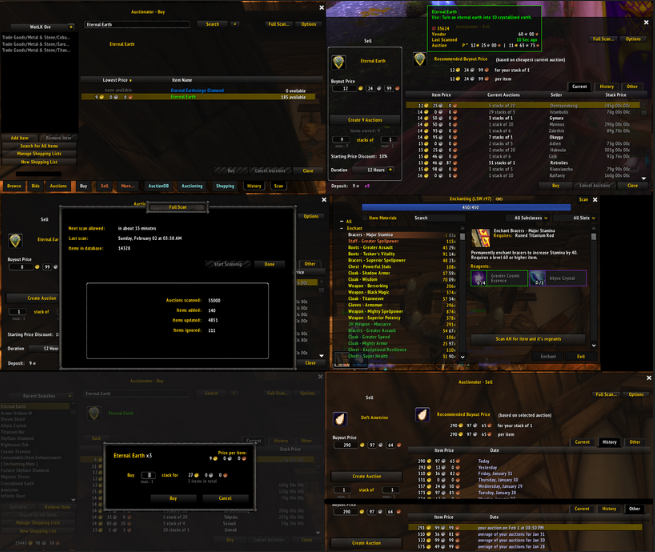
Auctionator is an Auction House addon that streamlines buying, selling and price checking with a simpler interface than the default AH.
Main features
- fast price scans.
- easier posting and buying workflows.
- shopping lists in supported versions.
- price history based on your scans.
How to use
Run a fresh scan before selling valuable items, review stack sizes and unit prices, and do not rely on stale historical prices in a fast-moving market.
Buying, selling, and price history
Auctionator 2.6.8 is the WotLK auction-house helper in the supplied archive. Its Interface 30300 TOC exposes buy and sell behavior, saved shopping lists, price history, a price database, stacking preferences and tooltip price options. It also stores per-character auction preferences such as which tab opens first and whether bags are opened for selling.
Use the shopping/search view to scan for an item, compare listed stack sizes and choose a listing. For selling, place an item into the selling area, review the suggested price and stack quantity, then confirm the auction yourself; the addon does not guarantee that an undercut is profitable. The price database is local and reflects the scans and purchases seen by that client, so old prices can be stale and a thin market can distort the mean. Enable tooltip prices only if the extra information is useful. Auctionator 2.6.8 is not the current Retail UI and its pricing rules should be evaluated against the WotLK economy.
What the local data means
Auctionator keeps price history and shopping lists in SavedVariables on the client. A scan updates the local view, but it does not make the database authoritative: expired auctions, a small sample, stack-size differences and a changing WotLK economy can all make the mean price misleading. Compare the suggested price with several current listings, choose the stack size deliberately, and use the shopping list again after a new scan when the market has moved.