The supplied AutoFlood archive contains AutoFlood v1.1, marked for Interface 30300. Its purpose is narrow: it keeps one saved chat message and sends it repeatedly through the selected chat system while the addon is enabled. It is not a whisper-keyword invite tool and it does not provide a queue of different announcements.
What it sends
The message is stored per character and realm in the saved variable AF_config. You can replace it with your own text, then select the destination with the addon command. The source accepts Say, Guild, Raid, Party, and Battleground output, plus a joined numbered chat channel resolved through Blizzard's GetChannelName. A trade or LFG channel therefore has to be one of the channels your character is already in; AutoFlood does not search for channels or switch between them automatically.
AutoFlood sends the same configured message once the interval expires. The source does not implement multiple-message rotation, keyword triggers, recruitment filters, or separate group/guild rules. It also does not add its own chat queue. Messages are passed to WoW's SendChatMessage, so normal game/channel restrictions still apply.
Commands and timing
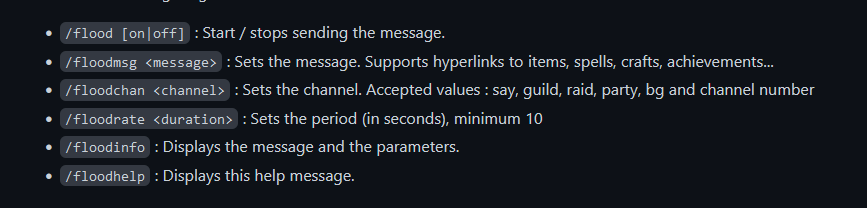
/flood onand/flood offstart or stop sending. With no argument,/floodtoggles the state./floodmessage <message>or/floodmsg <message>changes the saved text./floodchannel <channel>or/floodchan <channel>selects the supported chat destination./floodrate <seconds>sets the period between messages./floodinfoor/floodconfigprints the current message, channel, and rate;/floodhelpor/floodmandisplays the built-in help.
The source rejects a period shorter than 10 seconds. It does not document a separate anti-spam scheduler or a safe interval recommendation; the configured period is simply checked against that minimum and then handled by the frame's update timer.
Practical use
Set a single recruitment, trade, crafting, or event announcement, choose the channel in which you are already allowed to speak, set the period, and use /flood on. When the announcement is no longer needed, use /flood off. This one-message timer model is the important distinction from BASpammer: AutoFlood's verified source exposes explicit message, channel, rate, status, and help commands, but no multi-message campaign or keyword-based automation.
Installation
Install the supplied AutoFlood folder in Interface\AddOns and enable it for the character. The archive contains the Lua, XML, and localization files required by this build.