
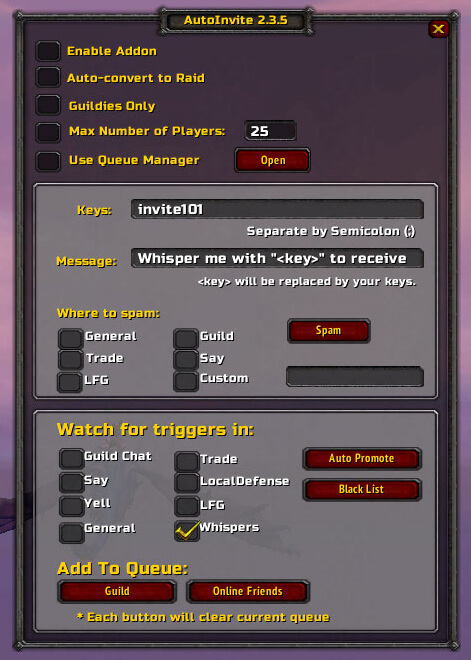
The production archive is AutoInvite 2.3.5 by Martag. Its TOC is marked Interface 40000, while the included README and changelog describe the WotLK-era feature set and a patch 3.2 update; treat this uploaded build as the specific source used on the site rather than assuming later Classic or Retail behavior.
How invitations are triggered
When AutoInvite is enabled, it checks incoming messages for configured trigger text. Triggers are case-insensitive and matched as text contained in the message, not as a separately confirmed whole-word command. Multiple triggers can be entered in the interface, separated with semicolons. The source can listen to whispers and, when enabled, guild, say, yell, General, Trade, Defense, LookingForGroup and a selected custom channel.
A matching player is invited when the character has the required party or raid leadership/invite authority. Guild-only mode restricts automatic invitations to guild members. The source also keeps a blacklist whose entries are ignored before the trigger is processed. There is no confirmed whitelist, and the code does not automatically accept invitations sent to the player.
Group and raid controls
The addon can put matching players into an invite queue instead of inviting immediately. The queue window can be used to remove entries, invite selected players or invite everyone in the queue. Separate controls can add currently online guild members or friends to the queue, and the interface includes manual guild/friend invitation actions.
An Auto Convert to Raid option calls the WoW party-to-raid conversion when the player is party leader and the party has more than two members. A maximum-player option prevents further automatic invites after the configured party or raid limit is reached and sends the requester a full-group message. These controls help assemble a group, but AutoInvite is not a complete raid-roster manager.
Announcements and commands
The built-in Spam action sends a configurable message to selected Say, Guild, General, Trade, LookingForGroup or custom-channel destinations. The message can include <key>, which is replaced by the configured trigger text. Confirmed commands are /ai or /autoinvite for the window, plus enable, disable, toggle, r, list, bl and promote subcommands. The optional promote feature handles a friend whispering !promote <key> and can notify or grant raid assist according to its setting.
Practical use and installation
Enable the addon, enter one or more invite keys, select the channels to monitor, and announce the key. Players then send a matching whisper or post it in an enabled channel; AutoInvite checks the guild-only, blacklist and group-cap rules before inviting or queueing them. Disable the addon after recruitment. Install the supplied AutoInvite folder under World of Warcraft\\Interface\\AddOns. Because the archive is marked Interface 40000, verify it on the intended 3.3.5a client before relying on it for a live group.



