
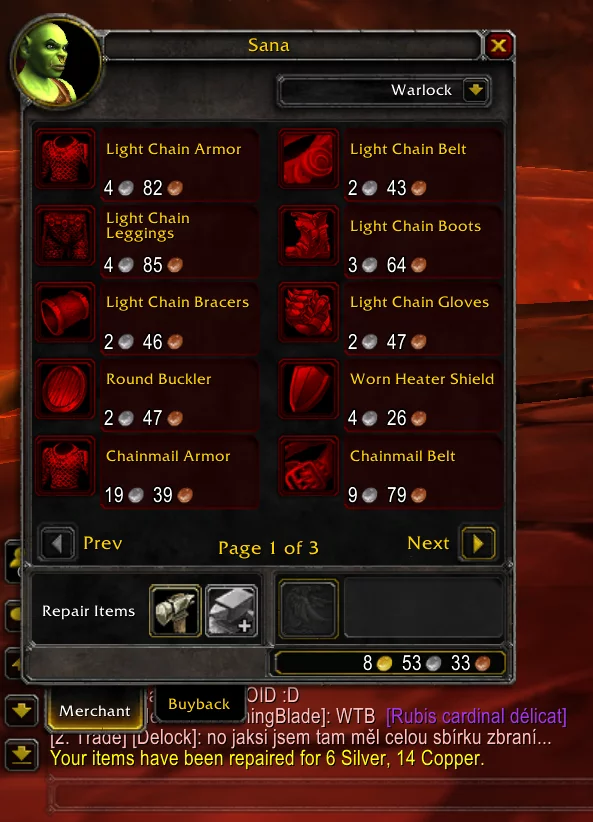
AutoRepair hooks merchant interaction and repairs repairable items automatically when a repair-capable merchant window opens. Its Interface 30300 package contains a single Lua/XML implementation and no external dependency.
Using it
Visit a repair-capable merchant after a session. It cannot repair in the field, without enough gold or without a merchant, and provides no durability dashboard or documented slash command.
Merchant event
AutoRepair hooks MERCHANT_SHOW and asks the client to repair repairable items when a repair-capable merchant window opens. It does not watch durability continuously and cannot repair away from a merchant. Repairs can fail when the merchant does not offer repairs or the character lacks enough gold. The Interface 30300 archive contains one Lua/XML implementation, no external dependency, and no documented slash command or durability dashboard. Test it by opening a repair merchant after a session.
Repair event and failure cases
AutoRepair listens for MERCHANT_SHOW. When the opened merchant can repair, the client repair call is made automatically for repairable items. The addon does not poll durability while travelling, so no action occurs when the character is not interacting with a merchant. It also cannot repair a broken item when the merchant has no repair service or the character lacks enough gold.
Test it by visiting a repair-capable merchant after taking controlled durability damage, then compare the money change and item durability with the Blizzard repair result. The package has no durability dashboard, no documented slash command, and no setting panel; its one purpose is the merchant-triggered repair action. The Interface 30300 archive contains a small Lua/XML implementation and no external dependency.
If no repair occurs, first verify that the merchant actually offers repairs and that the addon is enabled. A vendor that only sells goods is not a supported trigger.



