
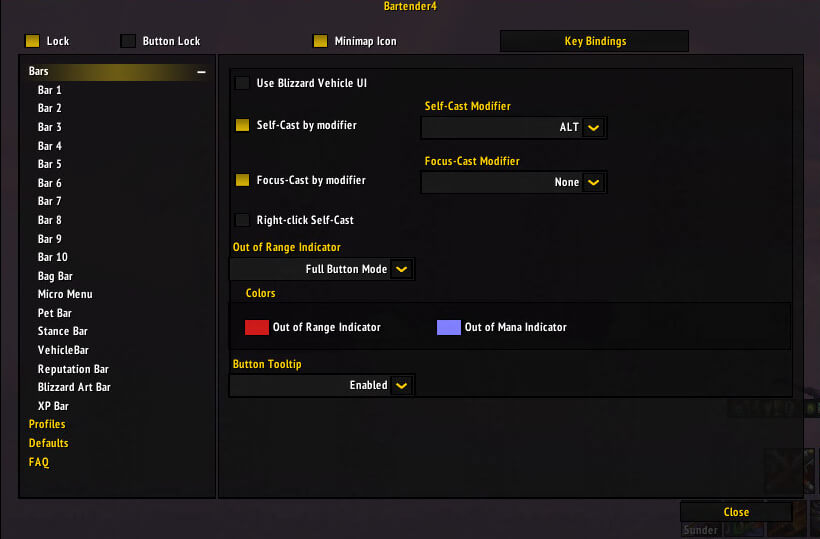
Bartender4 is a full action-bar replacement that provides precise control over Blizzard action bars and related UI bars.
Main features
- move and resize action bars.
- paging and visibility conditions.
- pet, stance, bag and micro-menu bars.
- fast keybinding through KeyBound in supported builds.
How to use
Unlock the bars, place them, set keybinds, and then lock everything. Test stance or vehicle paging before entering serious content.
Bartender4 action bars
Bartender4 4.4.2-12-g94f3b58 replaces Blizzard action-bar presentation with configurable bars. The package stores profiles in Bartender4DB and lists Ace3, ButtonFacade, LibKeyBound, LibDBIcon and LibWindow as optional dependencies. Open the Bartender configuration, enable the required bars, set their size and spacing, then drag each bar with the mover to its desired location.
Configure paging and visibility for the bars that change with stance, form, vehicle or modifier, then test every state before combat. A bar can be hidden while still holding actions, so verify the page that appears after a stance or modifier change. Bartender4 controls the action-bar frames; key bindings and the macros assigned to slots remain separate systems. Save a profile after the layout is complete.
Configure bar visibility and paging while standing still, then test stance, form, vehicle and modifier states. Save the profile only after every state shows the intended actions; Bartender changes frames, while key bindings and macro text remain separate.
Use the profile system after testing every paging state. Bartender controls bar visibility and position, but the key binding interface and macro text remain Blizzard systems that must be checked separately.
Pet, bag, micro-menu and vehicle bars can be enabled separately from the main action bars. Use the mover and visibility controls to keep utility bars available without covering raid frames. KeyBound, when installed, assists with binding actions, but the actual binding remains a protected Blizzard action and should be verified after paging or stance changes.



