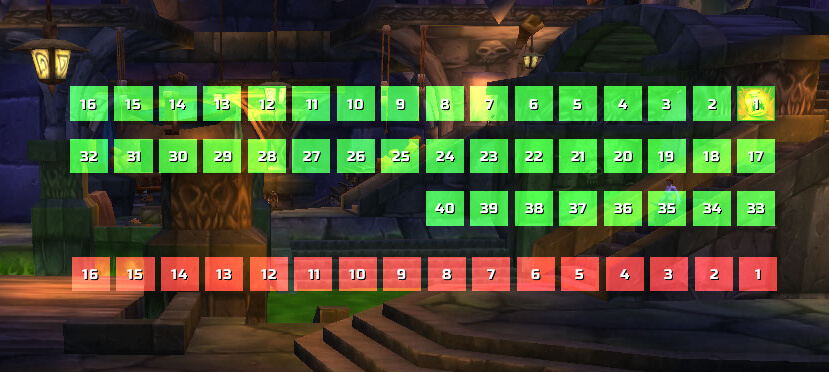
The production archive is Bison version 1.4.3, marked r10-release by Grayal. Its TOC declares Interface 30000, so it is an older WotLK-era build rather than a separately verified 3.3.5a-specific package. Bison is a player aura layout addon: it replaces the standard player BuffFrame and TemporaryEnchantFrame with configurable icon bars.
What Bison displays
The code creates three separate bars for the current player: Buff Buttons for helpful auras, Debuff Buttons for harmful auras, and Weapon Buttons for temporary main-hand and off-hand enchants. It reads the player unit's aura updates and shows the icon, tooltip information, stack count where supplied by the game, and remaining time when timer display is enabled. Debuff buttons use the normal debuff border, while weapon buttons use the weapon-enchant information and tooltip. Bison does not create target, party, raid, or general unit-frame aura panels, and no separate aura filtering system is present.
Layout and timers
Each bar can be enabled or hidden and positioned on the screen. Unlock the bars while arranging them, then use the lock option after choosing their positions. The settings include icon scale, horizontal and vertical spacing, number of rows and columns, and horizontal or vertical growth. Negative padding values reverse the corresponding growth direction. Buff and debuff bars can sort by Blizzard order, name, remaining time, or duration, in ascending or descending order. Timer presentation can use Bison or Blizzard-style time text, and flashing can warn when an effect is near its end.
Practical use
Open /bison or /bi to reach the configuration panel, then configure Buff Buttons, Debuff Buttons, and Weapon Buttons independently. Move the buff bar near the area where you watch your rotation, keep debuffs separate when you need to notice harmful effects quickly, and place the two weapon-enchant buttons where temporary enchants are easy to check. The addon stores these layout choices in BisonDB through AceDB profiles, so profiles can be created, copied, reset, and selected from the profile options.
Installation
Place the supplied Bison folder, including its bundled libraries, directly under World of Warcraft\Interface\AddOns. Enable Bison for the character and open its options with /bison.