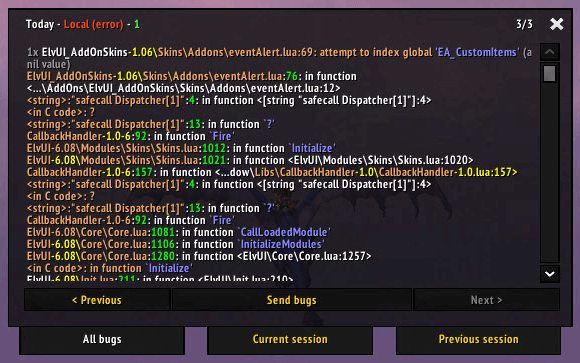
This archive contains BugSack 3.3 and !BugGrabber 2.2 for the WotLK 3.3.5a client (Interface 30300). BugGrabber is the capture layer: it catches Lua errors and stores the error message, type, session, time and repetition counter. BugSack is the display and management layer that reads those records and presents them in an in-game viewer. BugSack will warn that !BugGrabber is missing, so the two folders are intended to be installed together for this build.
What BugSack does
When an addon produces a Lua error, BugGrabber records it instead of leaving the useful details only in the default error popup. BugSack receives the capture event and can show a notification, play a sound, print a message to the chat frame, or open its viewer automatically, depending on the selected options. The current session is available in the sack, and earlier sessions can be opened from the viewer when they contain errors.
An error entry includes the formatted message and debug stack information. BugSack highlights file and line references, local values and other parts of the captured text, so the entry can point toward the addon or code path that failed. Repeated occurrences of the same error in one session are counted instead of being treated as unrelated entries. This makes it easier to distinguish one recurring fault from many different faults.
Practical troubleshooting workflow
Leave BugGrabber and BugSack enabled while reproducing the problem: open the affected panel, visit the zone where the error appears, or perform the action that triggers it. Open the viewer with /bugsack, select the current session or an earlier session, and inspect the error text and stack. Look for the addon name, file path and line reference before changing settings or disabling addons. The text area is useful for selecting the captured details for a bug report or for comparing the same error after a configuration change.
BugGrabber also provides /buggrabber. With an error index it prints a selected captured error, which is useful when a full BugSack window is not open. The source registers this command only after an error has been captured, and its usage is /buggrabber <number>. These commands display diagnostic data; they do not repair the addon that caused the error.
Sessions, saving and cleanup
The BugGrabber database keeps session information and can retain previously captured errors. BugSack's options include Save errors, a configurable error limit, and a Wipe saved bugs action. Clearing the sack removes stored records through BugGrabber's reset function, so copy or report anything important before using that control. The build limits the stored error list to a configurable value up to 1,000 entries.
BugGrabber can throttle capture when an addon generates more than 20 errors per second; the source pauses capture for 60 seconds and then resumes. This protects the error list from being flooded, but it also means that a rapidly repeating fault may not produce a separate record for every occurrence. The Filter addon mistakes option changes whether addon action errors are registered for capture, so leave it enabled when diagnosing an addon that fails during an action.
Notifications and access
BugSack can show the current error automatically, send a notice to the chat frame, and play the bundled error sound or another LibSharedMedia sound when a new error arrives. The Auto popup, Chatframe output, Sound or Mute, and Save errors controls are available in the options panel. If LibDBIcon-1.0 is present, the package can also expose a minimap icon; its tooltip reports the current session count, and the icon can open BugSack, reload the UI, or clear the sack through its documented clicks. LibDataBroker support is included for broker displays.
Installation and limitations
Close the game, extract both !BugGrabber and BugSack as separate folders directly into Interface\AddOns, and enable both at character selection. If BugSack reports that BugGrabber is missing, check that the exclamation-mark folder was not renamed or placed inside an extra nested directory. This is an old Interface 30300 build; its capture behavior, options and error details are limited by the WotLK 3.3.5a Lua API. It records and displays diagnostic information, but it cannot identify the correct fix automatically, and a stack trace may still require testing the addon named in the error.