ChatFilter version 0.1 filters selected chat messages by matching them against a saved keyword list. The archive contains one Lua file and a TOC marked for Interface 41000, so the package should be treated as an older, unverified build rather than assumed to be a normal WotLK 3.3.5a release.
What it filters
The addon registers message filters for CHAT_MSG_CHANNEL, CHAT_MSG_SAY, and CHAT_MSG_YELL. It compares each message with the configured words without regard to letter case. The initial keyword list is wts, wtb, recruting, and lfw. A matching message is hidden and added to an in-memory log.
Filtering is skipped while the addon is inactive and for messages from guild members, friends, party members, and raid members. Whisper filtering is present only as a commented-out registration in the supplied Lua file, so whispers are not filtered by this archive. The log keeps up to 20 messages. Verbose mode prints a notification when a message is filtered, with a two-second notification interval.
Commands
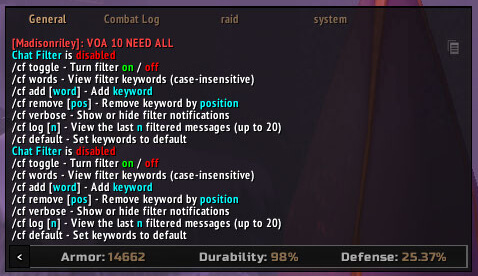
Use /chatfilter or /cf. The command handler supports /cf toggle to enable or disable filtering, /cf words to print the current list, /cf add word and /cf remove number to edit it, /cf verbose to toggle notifications, /cf log [n] to display recent filtered messages, and /cf default to restore the four bundled keywords. The active state, keyword list, and verbose setting are saved variables.
Version limit
The supplied TOC says Interface 41000 and the source does not include a WotLK 3.3.5a compatibility marker. Test the archive on a separate character before relying on it. No external dependency or graphical configuration panel is declared in the supplied files.
Installation
- Extract the
ChatFilterfolder intoInterface/AddOns. - Enable it at character selection.
- Use
/cfto check the state and configure keywords.