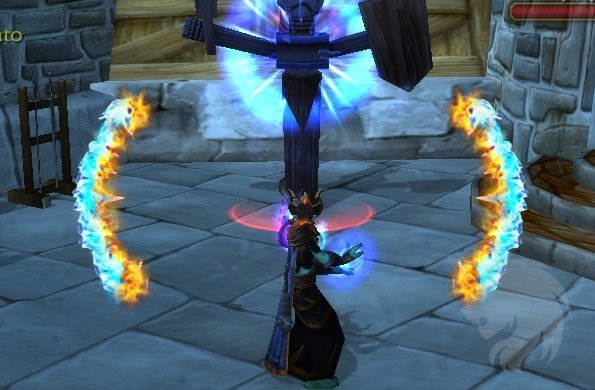
Cheese is a WotLK 3.3.5a addon that recreates the Cataclysm-style spell activation overlay for the older client. It watches the player's active buffs and highlights recognized proc states with animated graphics in the center of the screen. Cheese is not a general cooldown tracker and does not require you to build each alert manually: its spell and texture data are bundled in the archive.
What Cheese recognizes
The supplied version uses a fixed spell-ID table covering proc and state effects from several WotLK classes. The archive includes entries such as Mage Hot Streak, Brain Freeze and Arcane Missiles; Paladin Art of War, Grand Crusader and Daybreak; Druid Eclipse and Shooting Stars; Shaman Maelstrom Weapon and Fulmination; Warrior Sudden Death and Sword and Board; Rogue Slice and Dice; Death Knight Killing Machine and Rime; Warlock Backlash and Molten Core; Hunter Lock and Load; and Priest Surge of Light and Serendipity. These are examples from the packaged data, not a user-editable list.
How the alerts are triggered
Cheese listens for UNIT_AURA on the player and compares active buff spell IDs with its overlay table. When a supported effect appears, it creates the matching texture, position, scale and color data for an animated center-screen alert. When the buff disappears, the corresponding alert is removed. The addon does not use a separate countdown timer or combat-log prediction; the visible state follows the aura currently reported by the client.
At PLAYER_LOGIN, Cheese maps spells already placed on the action bars. It also handles ACTIONBAR_SLOT_CHANGED when an action-bar slot changes. If a recognized proc spell is on an action bar, Cheese can add Blizzard-style glow feedback to that button while the proc is active. The center overlay can still show the recognized effect even when the spell is not currently placed on an action bar.
Settings and limits
Open the Blizzard Interface Options and select Cheese. The supplied 1.0 build exposes Show Spell Alerts and an Opacity slider from 0.1 to 1.0. These settings are stored per character. There are no slash commands, no Ace3 dependency, and no editor for adding arbitrary spells. Cheese only reacts to the spell IDs and overlay assets included in its data tables, so a proc absent from that table will not produce an alert.
Practical use
Place the relevant class abilities on your action bar, enable Cheese, keep the spell alerts visible, and set the opacity high enough for your UI scale. During play, the center animation is the broad proc cue; the action-button glow is the direct cue for a supported spell on your bar. The archive targets Interface 30300 and includes its Lua, XML and texture files, so this version should be treated as a client-specific 3.3.5a overlay rather than as a modern retail addon.
Installation
Extract the supplied Cheese folder into Interface\\AddOns, enable it for the character, then open Interface Options to configure the two available controls.