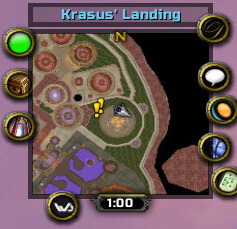
CleanMinimap is a minimal minimap replacement that removes clutter and provides cleaner square or round layouts. It is useful when you want this information or control available inside the game without adding an unnecessarily large UI package. The goal is to make a specific WotLK 3.3.5a task quicker and easier to read while leaving the rest of the interface largely unchanged.
Main features
- square or round minimap styles.
- scale and button arrangement controls.
- ability to hide selected default minimap elements.
- compact visual design.
How to use
Open the addon or Rock configuration if present, choose the map style, then hide only elements you are sure you do not need.
Installation
- Download the addon archive for your WotLK 3.3.5a client.
- Close World of Warcraft before replacing addon files.
- Extract the addon folder into World of Warcraft\Interface\AddOns.
- Start the game and make sure the addon is enabled on the character-selection screen.
- Test its basic function in a safe situation before using it in a raid, arena, Auction House session, or other important activity.
If CleanMinimap does not appear to work, first check for an extra nested folder inside AddOns and confirm that you downloaded a build intended for the 3.3.5a API. Old WotLK addons often have several forks, so commands and optional modules can differ slightly between packages. Keep a backup of a working addon folder before replacing it with another fork.
Practical tip
Configure the addon around decisions you actually make during play. A small, readable setup is usually more useful than enabling every optional alert, panel or statistic. After changing settings, reload the UI if the build requires it and verify that the information remains visible at your normal resolution and UI scale.