
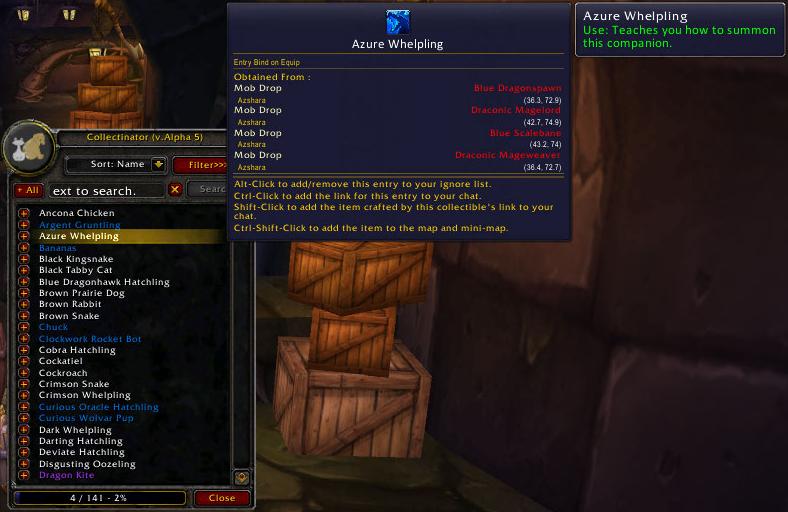
Collectinator v1.0.4 is a WotLK 3.3.5 collection checklist for the current character. Its main window has two collection tabs: mini-pets (CRITTER) and mounts (MOUNT). The included database contains entries for the 3.3.5 game data and records how an entry can be obtained, rather than acting as a general account-wide collection service.
What the scan does
When you click Scan in the companion window, Collectinator reads the current character's known pets and mounts through the WotLK companion API, matches their spell IDs against its database, and marks those entries as known. Entries not found in that character's companion list remain unknown. The window shows totals and separates known and missing entries, so you can use it as a character-level checklist. Run the scan after opening the relevant companion tab; the addon does not document an account-wide or automatic character synchronisation mechanism.
Filters and acquisition data
Filters can include or hide known or unknown entries and can narrow results by faction, profession, binding, rarity, game era, reputation, and acquisition type. Acquisition filters cover database-supported sources such as vendors, quests, instances, raids, crafted items, seasonal content, world drops, mob drops, PvP, achievements, and reputation. The entry details can show a vendor, quest, mob, zone, coordinates, faction, reputation, or trade skill when that information exists in the build. Profession filters therefore help find collectible mounts or pets with crafted or profession-related acquisition data; this version does not present a separate list of every recipe known by the character.
Useful in-game controls
Use /collectinator to open its configuration GUI; the documented scan argument starts a scan. A normal scan-button click opens the results, Shift-click creates a text dump, and Alt-click removes Collectinator map waypoints. Clicking an entry expands its acquisition information; Ctrl-Shift-click can add that entry's acquisition methods to the world map and minimap. The addon also adds collectible information and acquisition text to supported tooltips.
Installation
Extract the supplied archive so the Collectinator folder containing Collectinator.toc is directly under World of Warcraft\Interface\AddOns. Enable it for the 3.3.5a client, open the companion window, and run a scan.



