
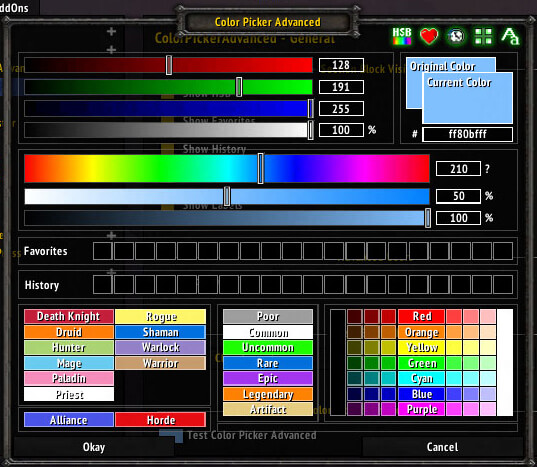
Color Picker Advanced is a utility that extends the standard WoW color picker with more precise color controls.
Main features
- numeric color values.
- reusable or easier-to-copy color selection depending on build.
- useful for UI and addon configuration.
- works when another addon opens the standard color picker.
How to use
Open any addon option that uses the Blizzard color picker. The advanced controls appear with the normal picker and let you choose a more precise color.
Choosing an exact color
Color Picker Advanced replaces a minimal color choice with RGBA and HSB sliders, numeric text and hexadecimal entry. The package also provides favorite and history slots plus swatches for class, faction, quality and rainbow colors. Use the picker from an addon option that invokes the shared color control, enter the exact hex value when a design must match another frame, and save it as a favorite for reuse.
The picker supplies a color to the calling addon; it does not recolor the interface by itself. If a color does not change, the consuming addon may store its own profile or may not support alpha. History is local to the picker and reflects colors actually selected on that client.
Use hex entry for repeatable UI colors and favorites for the colors used by several profiles. Alpha is meaningful only when the consuming frame supports transparency; the picker cannot force that behavior.
Favorites and history make repeated profile work faster, while the RGBA values allow a transparent overlay when the receiving addon supports alpha. The picker only returns the selected color to that addon.
Use the text and hex fields when an exact color must be shared between profiles. The history records selections made through this picker, not every color used by unrelated addons.



