GitHub: TrinityCore/wow_335a_addons
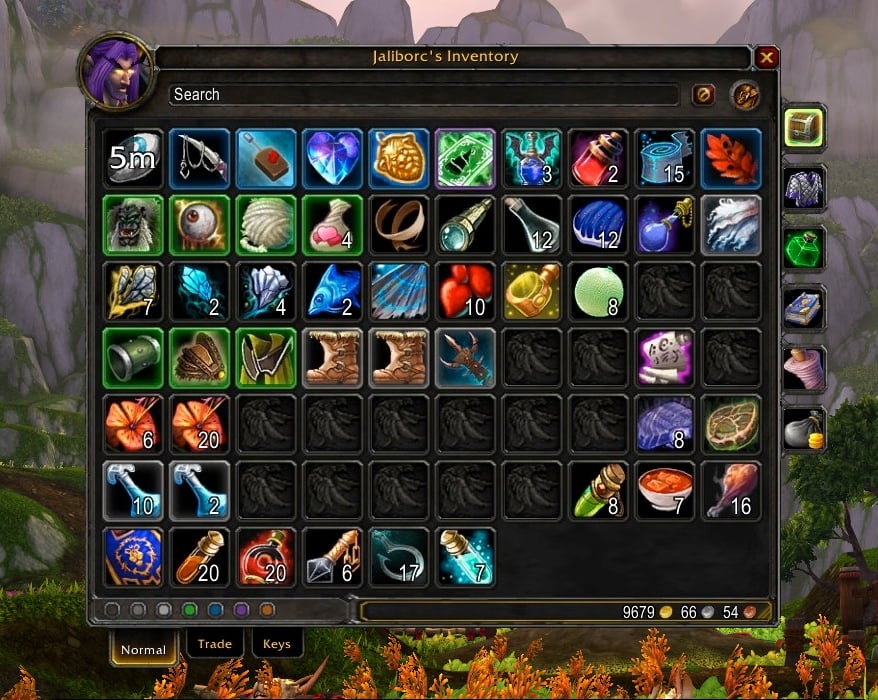
Combuctor 2.2.2 is an inventory browser for the WoW 3.3.5a client. It builds a single view from the bags belonging to the current character instead of making you open each container one at a time. The addon also has a separate bank frame, so the same workflow can be used when the bank is open.
What the archive actually provides
The production archive targets interface 30300 and contains the main Combuctor addon together with Combuctor_Config and Combuctor_Sets. The configuration module adds the options page, while the sets module supplies the built-in item rules used by the filters. Combuctor also embeds LibItemSearch-1.0. Bagnon_Forever is listed as an optional dependency: when its character data is available, the portrait dropdown can be used to inspect cached bags from other characters; without that data, Combuctor only has live information for the current character.
Finding an item quickly
Open the inventory view and type an item name or part of its tooltip text into the search box. Combuctor narrows the grid as you type, which is useful for locating a reagent, quest item, consumable or piece of equipment without remembering which bag contains it. The search library also supports explicit filters for item quality (q:), item type or subtype (t:), and tooltip states such as bind on equip, bind on pickup, bind on use, bind to account and quest items. Text terms can be combined with the search syntax supported by the included library.
Categories, counts and bank work
The side and bottom filters are rule-based views rather than manually created folders. The supplied sets include All, Equipment, Usable, Quest, Trade Good, Projectile, Soul Shard and Misc, with narrower rules such as Armor, Weapon, Trinket, Consumable, Devices, Gems and Recipes. Selecting a category leaves only matching item slots in the grid. Stack counts remain visible on the item buttons, so you can check how many reagents or consumables are available while deciding what to move or buy.
Combuctor keeps inventory and bank as separate windows and can show the bank bags together with the bank slots. The bank data is live only while the character has access to the bank; after leaving it, the displayed bank view should be treated as cached data rather than a new scan. With Bagnon_Forever data, the character selector can show saved inventory information for another character, but it does not turn an unvisited bank into a live remote bank.
Useful WotLK workflows
Before a raid or dungeon, search for the relevant consumable and use the Usable or Consumable set to check the stacks across your bags. For professions, select Trade Good and then Gems or Recipes where applicable; for quest preparation, the Quest set gives a narrower view without manually sorting every slot. When cleaning the bank, switch to Equipment, Trade Good or Misc, inspect the stack counts, and then move or vendor items from the filtered result.
For a second character, open the portrait menu only if Bagnon_Forever has previously recorded that character. This is useful for checking whether an alt has a saved reagent or item, but it is not a substitute for visiting that character's bank. If an item does not appear in a cached view, check the character data source and then verify the live character or bank directly.
Opening and configuring Combuctor
The addon registers both /combuctor and /cbt. Use /cbt bags to toggle the inventory view, /cbt bank to toggle the bank view, and /cbt options (or /cbt config) to open the options panel. Running the command without an argument prints the available commands.
The options panel controls which item sets and subsets are available for the inventory and bank filters. The frame can also be moved and resized in-game; its saved profile stores the window position, dimensions, whether the individual bag buttons are shown, and which side contains the category filter. The built-in key bindings provide separate actions for toggling inventory and bank, so the windows do not have to be opened from the default bag buttons.
Limitations and troubleshooting
This is an old 2.2.2 backport, not a modern inventory addon. Its categories depend on item information returned by the 3.3.5a client, and tooltip-based searches may not match until the client has loaded the item's information. Cached characters require Bagnon_Forever data and are not live. Bank slots also cannot be queried as current data when the character is away from the bank.
If the windows do not appear, first check that the folders containing the .toc files are directly inside Interface/AddOns, enable Load out of date AddOns, and make sure the main Combuctor folder is enabled. If the configuration page is missing, check that Combuctor_Config is installed with the archive. If search results or categories are incomplete, clear the search field, allow item tooltips to load, and verify the item in the live inventory; changing the filter cannot create data that the client or an optional character-cache addon has not supplied.