
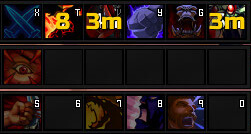
Cooldowns 1.3.3 displays numeric cooldown counters over action buttons at least 28 pixels wide. Its readme and XML expose Interface Options for colors, fonts and counter settings, and save YarkoCooldowns_SavedVars.
Using it
Read the number printed on each cooling-down button and open Interface > AddOns > Cooldowns to change presentation. A custom font requires a WoW-relative folder and filename.
Counter settings
Cooldowns 1.3.3 draws numeric counters over action buttons at least 28 pixels wide. Its Interface Options panel controls colours, fonts, outline, shadow, tenths, and the seconds threshold, with settings stored in YarkoCooldowns_SavedVars. A custom font must already exist in a WoW-relative folder and use the filename expected by the package. The addon changes presentation only; it does not reset or shorten cooldowns. This is the supplied Interface 30300 build.
Counter and font options
Cooldowns draws a number over a supported action button when the action is cooling down. The readme's 28-pixel minimum explains why a small custom bar can show no counter: the frame is below the size the addon expects. It does not shorten the cooldown or change the spell's state; it only reads the button and paints the remaining time.
Open Interface Options, choose Cooldowns, and adjust the main counter colour, flash colour, font file, font height, outline, shadow, tenths display, and the threshold used for seconds. A custom font must be placed in a WoW-relative folder before selecting it, and the path/file naming rules in the readme must be followed. Check a long cooldown and a short cooldown after changing the threshold to see whether the display matches the intended precision.
The supplied release is 1.3.3 for Interface 30300 and saves settings in YarkoCooldowns_SavedVars. If only some bars show counters, compare their button dimensions and whether the bar exposes the normal action-button structure.



