
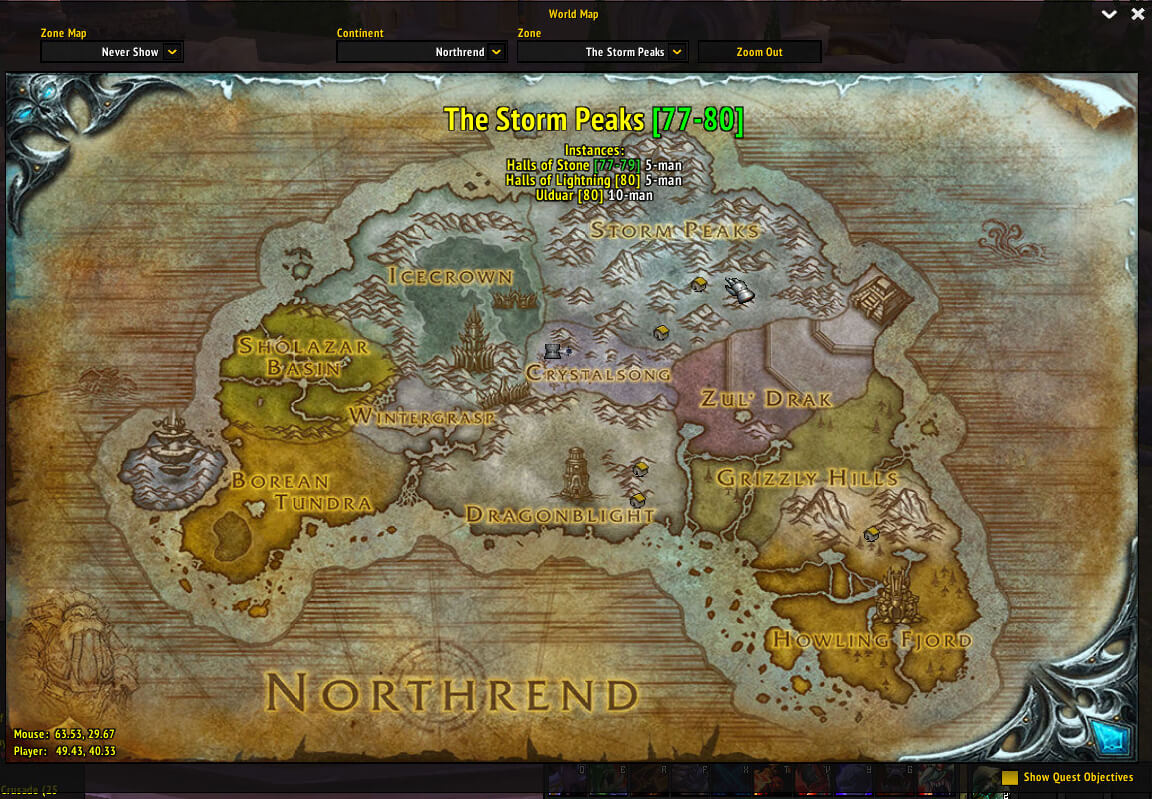
Cromulent v1.5.2 adds extra zone and instance information to the default World of Warcraft world map for the WotLK 3.3.5a client. It works with the map's existing zone label and description instead of creating a separate map replacement.
What Cromulent shows
- Recommended level range for the selected zone, with a colour indicating how difficult that range is for your current character level.
- Instance information found in the zone, including the instance name, level range and group-size data supplied by the addon's map libraries.
- The zone's minimum fishing requirement when that data is available and the character has a Fishing skill to compare against it.
- Faction-based colouring for zone and instance information where the map data provides a faction association.
When you select a real zone on the world map, Cromulent appends the level and instance-size information to the zone label and places the additional entries below the normal map description. If the zone contains several dungeons or raids, they are listed together rather than requiring the player to remember each location separately.
Using it while planning travel
Open the world map and select a zone or instance area. Cromulent updates the information automatically as the map changes. Before travelling to a questing area, compare its displayed level range with your character level. When planning a dungeon trip, use the instance list and group-size information to identify what the zone contains. For fishing, the displayed requirement gives a quick check against the Fishing rank on the current character.
Dependencies and limitations
The archive includes Ace3, LibTourist-3.0 and LibBabble-Zone-3.0. These libraries provide the zone, instance, level and fishing data that Cromulent displays. The addon only adds information to the Blizzard world-map view: it does not create routes, waypoints, quest objectives or a separate minimap navigation system. Information is available only for zones and instances known to the bundled data, and fishing text is shown only where a fishing requirement is present and the character's skill can be read.
The published build targets interface 30300 and is version 1.5.2. Its source does not document a slash command or a separate options panel; normal use consists of opening the world map and selecting a zone.
Installation
- Extract the downloaded
Cromulentfolder intoWorld of Warcraft/Interface/AddOns/. - Enable Cromulent at the character-selection screen.
- Open the world map and select a zone to verify the additional information.



