GitHub: suprepupre/DefileAlert
DefileAlert 1.2.0 is a focused WoW 3.3.5a addon for the Lich King encounter in Icecrown Citadel. Its only job is to identify the player selected for Defile and get that information in front of the raid quickly. It is not a general boss-mod replacement and does not track the full encounter.
What DefileAlert watches
The addon enables its combat-log handling only while the player is in Icecrown Citadel. It listens for the Defile spell cast-start events recognized by the included build, including the four WotLK spell IDs used by the encounter. When the server supplies the destination name or a destination GUID that can be resolved to a raid or party member, DefileAlert announces that player immediately.
Some 3.3.5a server configurations do not provide a usable destination name in the combat-log event. In that case the addon records the Lich King's target at cast time and briefly checks the boss target for a change. The scan is intentionally limited to 0.4 seconds; if the target cannot be resolved confidently, the addon stays silent instead of displaying a potentially wrong player. A two-second debounce also prevents one cast from producing repeated announcements.
What the player sees
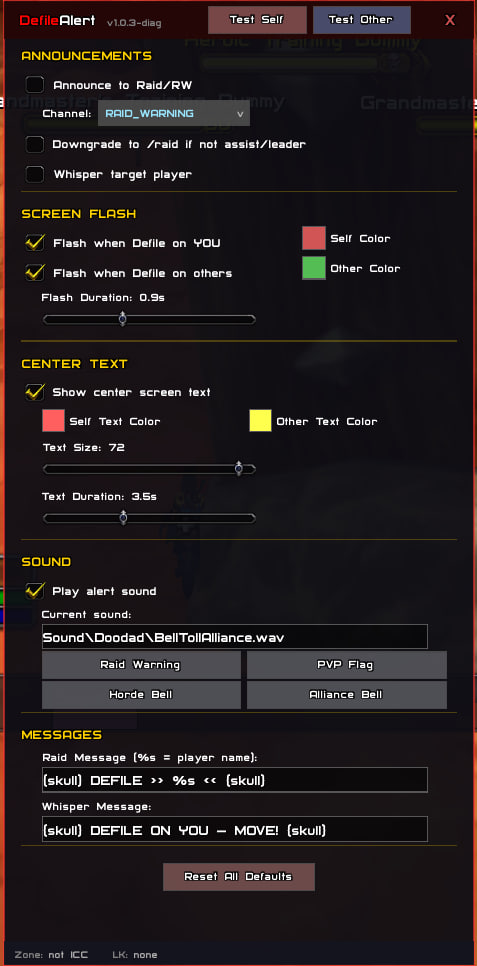
For a Defile on your character, the default configuration can show the large center message >>> DEFILE ON YOU <<<, flash the screen, and play the selected alert sound. For another player, the center text shows Defile: PlayerName. The separate “other player” screen flash is disabled by default but can be enabled and given its own color. A normal chat print also records the detected target locally.
When raid announcements are enabled, the addon sends the configured message to RAID_WARNING by default. If the player is not a raid leader or assistant, the build can downgrade that message to RAID. The channel selector also exposes RAID, SAY and YELL. The optional whisper setting sends the configured whisper to another player who was detected as the target; it is not needed for a Defile on yourself.
Practical use during Lich King
Keep the self alert enabled and choose a sound that can be recognized over combat audio. When DefileAlert identifies you, move according to your raid plan immediately so the pool is placed away from the group. When it identifies another player, the center text and raid message give the group a name to react to without requiring everyone to read the combat log.
The important limitation is that DefileAlert reports the detected target; it does not calculate a safe position, measure distance, or decide where the pool should be placed. Players still need to follow their encounter positioning rules. If no target can be resolved during the short scan window, no alert is issued, so the addon should complement—not replace—normal raid awareness and the raid leader’s instructions.
Optional DBM countdown
If DBM is loaded and exposes its timer callbacks, DefileAlert can use the recognized Defile timer to play its included countdown sound five seconds before the expected cast. This countdown is separate from target detection: DBM supplies the timing, while DefileAlert still obtains the actual target from the combat log or boss-target scan. The countdown can be disabled in the options. Without DBM, the target alerts continue to work, but this DBM-based five-second countdown is unavailable.
Configuration
The configuration panel lets you enable raid announcements, choose the announcement channel, downgrade raid warnings when you lack the required raid permission, and enable or disable whispers. It has separate switches and colors for flashes on yourself and on other players. Center text can be disabled, recolored independently for self and other targets, resized, and given a custom display duration.
The sound section enables the alert sound, accepts a sound path, and includes presets such as Air Horn, Raid Warning, PVP Flag, Horde Bell and Alliance Bell. Raid and whisper message fields are editable; the raid message uses %s for the detected player name. The panel also includes test buttons for a self alert and an “other player” alert, plus a reset-to-defaults action. Open it from the Blizzard Interface Options entry or with the commands below.
Confirmed commands
/da,/da config,/da options,/da opt,/da guior/da settings— toggle the configuration panel./da test— run the self-alert test./da testother— run the other-player alert test./da diag— toggle diagnostic output, including whether DBM is connected and which detection path was used./da status— print the ICC state, remembered Lich King unit, DBM connection, countdown, announcement channel and whisper state./da help— print the command summary.
The longer /defilealert alias is also registered.
Installation and troubleshooting
Extract the DefileAlert folder from the release archive directly into World of Warcraft/Interface/AddOns. The archive includes the Lua files and its two sound files; no external library dependency is declared. Enable the addon for the 3.3.5a client and use /reload after changing files or saved settings.
If the addon loads but does not announce anything, first test it with /da test, then check /da status while inside Icecrown Citadel. It intentionally does not process Defile events outside ICC. If the self test works but a real cast is silent, use /da diag to see whether the combat-log destination was available or whether the short boss-target scan timed out. A missing countdown is expected when DBM is not installed or its Defile timer callback is unavailable. If text appears but no sound plays, verify that sound alerts are enabled and that the selected sound path is valid in the client.
Version scope
The supplied archive targets interface 30300 and is intended for the WotLK 3.3.5a client. Its scope is deliberately narrow: Defile target detection and the configured alerts around it. It does not claim to provide a complete Lich King timer set, range checking, pool-size warnings, positioning guidance or a replacement for DBM.