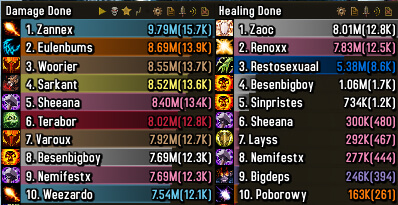
Details is a full combat-analysis meter that tracks damage, healing, deaths, threat and many other combat statistics.
Main features
- real-time damage and healing meters.
- breakdowns by spell, target and player.
- death logs and encounter segments.
- multiple configurable windows and plugins.
- reporting tools for raid analysis.
How to use
Use /details to open the options, create only the windows you need, and use spell or target breakdowns after a pull rather than judging performance from total damage alone.
Details plugins in this package
The supplied Details archive is a WotLK package with an Interface 30300 Encounter Breakdown plugin and a Tiny Threat plugin. Encounter Breakdown is intended to show detailed boss information, including phase-oriented damage views and graphic charts; Tiny Threat displays threat for group members and is selected from the plugin menu in the orange cogwheel. The archive also contains libraries with different interface tags, so the main 3.3.5 package should not be confused with a current Retail Details installation.
Open the Details window and use its orange cogwheel to select the required plugin or report view. During a boss encounter, keep one window on the current segment and switch to a phase or actor when investigating a mechanic. For threat work, enable Tiny Threat and select the threat view for the group. Details reports observations from the combat log; they do not prove why a player died or replace encounter knowledge. Plugins and modules must be enabled for their views to appear, and unsupported modern plugins should not be copied into this WotLK build.
Segments and interpretation
Do not read a single total without checking the segment and actor. Start a segment at the pull, select the boss phase or actor, then drill into spells, targets, deaths or threat depending on the question. Tiny Threat is a plugin view rather than a replacement for the normal Details window. Combat-log range, pets, absorbs and the selected plugin affect the result, which is why two clients can show different totals.