
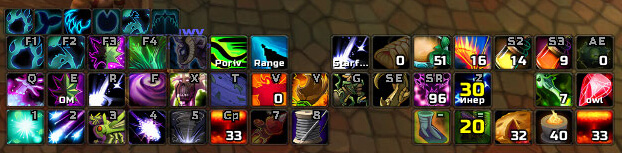
This archive contains Dominos 1.18.7 for the WotLK 3.3.5a client (Interface 30300), together with the separate Dominos Config package. Dominos replaces the visible Blizzard action-bar layout with configurable frames. It keeps the action buttons and secure behavior, but lets you decide where the bars are placed, how many columns they use, how they fade, and which game-state conditions show them.
Action-bar layout
The main Action Bar module creates movable action frames for spells, macros and items. In configuration mode, a bar can be unlocked and dragged to a new position. Its layout supports a chosen number of columns, button spacing and horizontal or vertical padding. Scale, normal opacity and faded opacity can be adjusted per frame, so a player can keep a compact combat bar near the character while moving less important controls to the edge of the screen.
Dominos also supports paging and secure show states in this build. A bar can use the game's action-page behavior, and frames can be configured to show or hide for conditions such as combat, a stance/form or another supported state. These are secure UI rules rather than a universal scripting language: use the configuration controls and the state syntax accepted by this Interface 30300 build instead of copying Retail instructions.
Additional bars included in the archive
The package is more than a row of replacement action buttons. The included modules provide:
- Pet Bar for pet actions and pet-specific bindings.
- Class Bar for a class resource or class-specific action bar when the character has one.
- Vehicle Bar for vehicle actions, including the buttons exposed by the vehicle UI.
- Bag Bar and Menu Bar for bag, character and game-menu controls.
- XP Bar and Quest Tracker for experience progress and the objective tracker.
- Cast Bar and Roll Bar for the corresponding game frames.
- Totem Bar for Shaman totem buttons, plus optional Buffs and Debuffs bars from the included aura modules.
- Minimap Bar and Minimap Zone Text Bar for moving selected minimap controls into Dominos-style frames.
Not every extra module has to be used. A player who wants only action bars can leave the other frames disabled or hidden, while a Shaman, pet class or frequent vehicle user can place the relevant contextual bar near the main layout.
Keybindings and interaction
The archive includes LibKeyBound-1.0 and exposes a binding mode for action buttons. When binding mode is active, the visible buttons can be used to assign or review keys instead of hunting through the default action-bar layout. Dominos can also show binding text on buttons. This changes the presentation of bindings; the secure action buttons still use the game's normal binding system.
Right-clicking a frame's drag handle opens the frame menu. That menu is used for layout and advanced settings such as columns, spacing, padding, opacity and visibility. Lock the bars after arranging them so an accidental drag does not move the combat layout.
Profiles and commands
Open the main configuration with /dominos or /dom. The command handler also exposes confirmed controls for frame properties and profiles, including setalpha, fade, setcols, pad, space, show, save, set, copy, delete, reset and list. The exact frame names and arguments are printed by the addon's command help, so use that help rather than guessing a frame identifier.
Dominos stores layouts in DominosDB and supports saved profiles. A practical workflow is to create one profile for a normal character layout, make a second profile before experimenting with a new bar arrangement, then copy or switch profiles when the layout is ready. This is useful for keeping a leveling, PvP or raid layout separate without rebuilding every frame.
Installation and version limits
Close the game and extract both top-level folders, Dominos and Dominos_Config, directly into Interface\AddOns. Enable Dominos at character selection; the configuration addon depends on Dominos and provides the graphical options. The archive embeds its core libraries and includes optional support for LibKeyBound-1.0 and ButtonFacade.
This is an older Interface 30300 build, not a modern Retail release. Its available modules are limited to the files in this archive, and state behavior depends on the secure action-bar API exposed by WoW 3.3.5a. If a bar does not appear, first check that the corresponding module is present and enabled, that the frame is not hidden by its show state, and that the two folders were not extracted inside an extra directory. Dominos changes the action-bar layout; it does not replace the game's spell, macro or keybinding data.



