
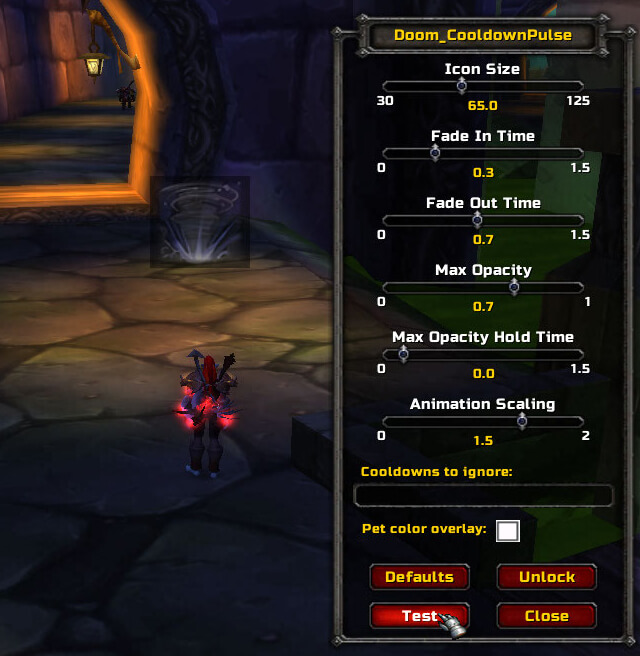
Doom Cooldown Pulse is a cooldown alert addon that flashes a large icon when an ability becomes ready again.
Main features
- large on-screen cooldown completion pulse.
- filters for which spells or cooldown lengths should trigger.
- position, scale and optional sound controls in supported builds.
How to use
Use /dcp to open the options, then test the icon position and choose which cooldowns you actually want to notice.
What the pulse means
Doom_CooldownPulse watches the cooldown state of abilities and flashes an ability icon in the middle of the screen when that cooldown becomes available. The effect is deliberately different from a permanent bar: it is a short visual prompt for an ability the player wants to notice immediately. The addon stores its settings in DCP_Saved and its 3.3.5 TOC exposes no external dependency.
Use the in-game configuration to select the abilities that should produce a pulse, then place the character in a real rotation where those abilities are used repeatedly. A melee player can use the pulse for a defensive or interrupt cooldown; a caster can use it for a major damage spell. The pulse should be treated as a reminder, not as a claim that the spell is safe to use: target, range, resource and encounter mechanics still apply. The package is Interface 30300 and does not provide modern aura tracking or a Retail-style cooldown bar.
Choose only abilities whose ready state matters in the chosen role; otherwise several simultaneous flashes become noise. The pulse is generated when the cooldown is available, while a spell can still be unusable because the target, range or resource check fails. Move the pulse away from the center if it covers cast bars or raid warnings.
Keep the pulse tied to a small role-specific list and use the visual prompt as the last step in a decision: confirm target, range and resource, then cast. This prevents a ready icon from being mistaken for an automatic action.



