
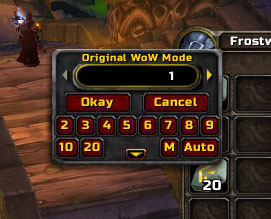
EnhancedStackSplit 30300-2 extends Blizzard's StackSplitFrame for WoW 3.3.5a. Its purpose is narrow but practical: it replaces repeated manual entry in the split-stack dialog with numbered amount buttons and two optional split modes.
What the buttons do
Shift-click a stackable item to open the normal Blizzard split frame. EnhancedStackSplit adds buttons for common quantities, including 2 through 10 and 20. In the original WoW mode, choosing a number sets the split amount and leaves the result on the cursor, so you can place it in a bag slot, trade it, buy with it, or destroy it. The addon's 1-Click mode immediately confirms the selected amount, equivalent to choosing the number and pressing OK.
The Auto Split mode is different: it repeatedly splits the source stack and places the resulting stacks into free bag slots. The code checks item-family compatibility and fills available slots from the top-left of the normal bags. Any remainder and the final partial stack stay in the original slot. The optional XL layout adds larger quantities such as 12, 14, 15, 16 and 20.
Practical limits
Auto Split is intended for items opened from bags or the bank. It only places output in the five normal bag slots, including their special item families; it does not provide a general-purpose destination for every custom container. A bag or bank replacement must expose Blizzard-compatible bag and slot IDs. If a custom frame does not, automatic placement can fail or leave the split frame open; press Escape to close it and use the normal cursor mode instead. The archive contains no separate slash-command system. Options such as the selected mode, XL layout and chat announcement are stored in EnhancedStackSplit_Options and can be changed through the addon options panel where provided.
Typical workflow
For mailing or crafting, open the source stack, click Auto, and choose the desired quantity so several usable stacks are distributed into empty bag slots. For trading or placing one stack in a specific slot, leave Auto disabled, choose the amount, and use 1-Click mode so the split remains attached to the cursor. Test automatic placement with a low-value stack when using a non-Blizzard bag interface, because full bags, bank-only slots and incompatible slot IDs are concrete limitations of this 30300-2 build.
Install the extracted EnhancedStackSplit folder under Interface/AddOns and enable it on the character-selection screen. This article describes the archived 30300-2 package, not the later Retail ReEnhancedStackSplit project.



