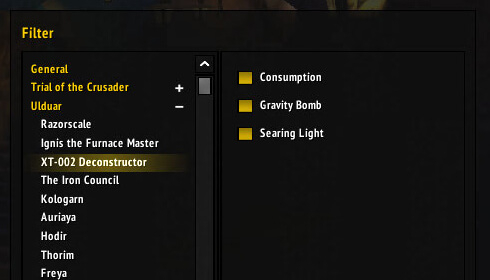
EnsidiaFails is a raid-fail reporting addon for WotLK that records supported encounter mistakes through LibFail and can report them during or after combat.
Main features
- toggleable fail checks.
- top and overall fail statistics.
- reset and deletion tools.
- different report timing styles.
- version synchronization so one player can handle announcements.
- chat commands such as !stats, !ostats and !wipe in supported builds.
How to use
Open the options with /ef or the WotLK-specific /efw build, then enable only the fail checks and report channels useful to your raid.
Raid fail reporting
EnsidiaFails listens to raid events and reports selected mistakes to raid chat. The package includes LibFail, LibSimpleTimer, boss and zone databases, talent queries and saved fail counters. Use /EnsidiaFails to open its configuration, then choose which fail types and chat reporting behavior are enabled.
Configure reporting before the pull and keep public output limited to failures the raid actually wants to review. During an encounter, the addon matches combat events to known boss mechanics; a custom encounter or modified spell ID may not be recognized. The counter and database are evidence for post-fight review, not a complete explanation of why a player died. Use the fail list after the pull to identify repeated positioning or mechanic mistakes.
After a pull, compare the fail count with the combat event that caused it. Do not report every event automatically; select the boss checks that the raid can act on and use the report as a review tool rather than public blame.
Keep reports focused on known boss failures and review the fail counter after the encounter. The libraries identify boss and zone events; they cannot interpret a custom encounter that uses different spell IDs.
Use the saved fail counters to look for repeated mistakes across attempts, then clear or separate the counters when starting a new review period. The addon is most useful when its reporting rules match the actual raid strategy.