EventAlert is a lightweight proc notification addon for WoW WotLK 3.3.5a. It displays noticeable on-screen alerts when important class abilities or talents proc, making short-duration effects easier to react to during combat.
The addon is useful for classes whose rotations depend on temporary procs and instant-cast opportunities.
How EventAlert works
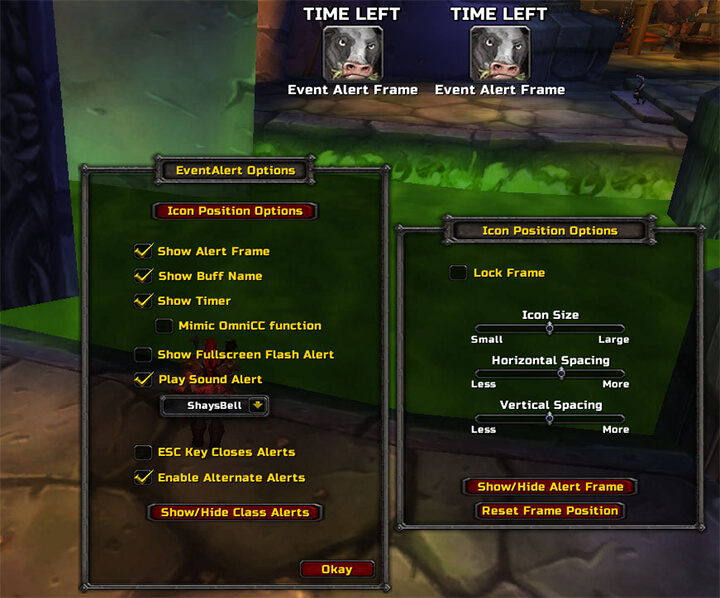
When a supported proc activates, EventAlert can display:
- Spell or ability icon
- Name of the proc
- Remaining duration
- A subtle notification sound
- Multiple active procs at the same time
The alert appears near the center of the screen by default, so you do not need to constantly watch your buff bar for important effects.
For example, a Mage can use EventAlert to notice temporary spell procs while continuing to focus on the encounter.
Configuration
EventAlert works immediately after installation with its default settings.
To open the options, type:
/ea options
From the options panel you can adjust how alerts are displayed, including their position and other visual settings.
Because the addon can track multiple procs simultaneously, several alerts may appear at once when multiple effects are active.
Installation
- Download the EventAlert archive.
- Close World of Warcraft.
- Extract the addon into World of Warcraft\Interface\AddOns.
- Start the game and make sure EventAlert is enabled.
- Type /ea options if you want to customize the alerts.
EventAlert is a simple alternative to larger aura addons when you mainly need clear notifications for important class procs.
Before you install
Keep a copy of your current addon folder and saved settings before replacing files. Confirm that the extracted folder is intended for the 3.3.5a client, enable it on the character-selection screen, and test the main feature outside important group content. If the interface behaves unexpectedly, disable unrelated addons temporarily and reload the UI.