
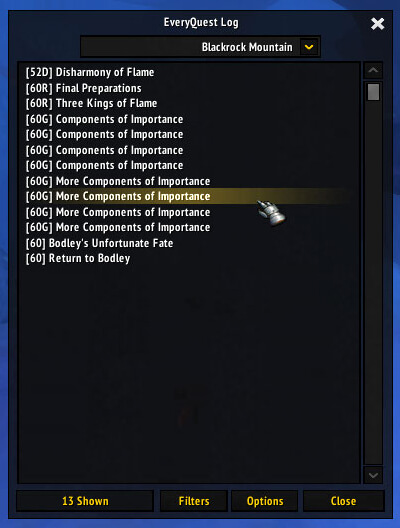
EveryQuest stores completed and incomplete quest data and provides zone checklists. The archive includes modules for dungeons, Outland, professions, world events and other regions, plus QuestGivers and HandyNotes-related map data; quest modules identify release r162.
Using it
Log characters in so quest state is saved, then open a zone list to find missing quests. Enable QuestGivers for map markers. The database cannot know private-server quest changes absent from its bundled tables.
Quest checklist
Log each character so the addon can store local quest state, then open a zone or category list to find incomplete entries. The archive includes r162 quest data and modules for dungeons, Outland, professions, world events, QuestGivers, and map notes. These are local tables and saved variables, not a live server query; a private-server quest change absent from the bundled database will not appear. Enable only the zone modules included with this Interface 30300 package.
Using the zone data
EveryQuest is most useful after each character has logged in and supplied its local quest history. Open the zone list, select a region, and use the incomplete entries to plan the next quest route. The category modules separate dungeon, Outland, profession, world-event, and other quest groups, so a completionist can check one type without scanning the entire database. QuestGivers and the map-note support can identify known quest starts when those modules are enabled.
The archive's r162 data is static. It can show that a quest exists in its bundled table, but it cannot query a private server to discover a custom prerequisite, changed reward, or removed quest. A character that has not logged in cannot contribute current completion state. If a list looks empty, first confirm that the main addon and the relevant zone module are enabled and that the character has been loaded on this client.
EveryQuest stores the result in its saved variables, so it is an account-side checklist rather than a remote progress service. The supplied Interface 30300 package should be kept with its included LibQuixote, Ace3, and localization modules.



