FatCooldowns tracks, transmits and displays raid cooldowns. The Interface 30300 package contains class modules for major WotLK classes and uses talent-query, shared-media and bar libraries to identify and display group abilities.
Using it
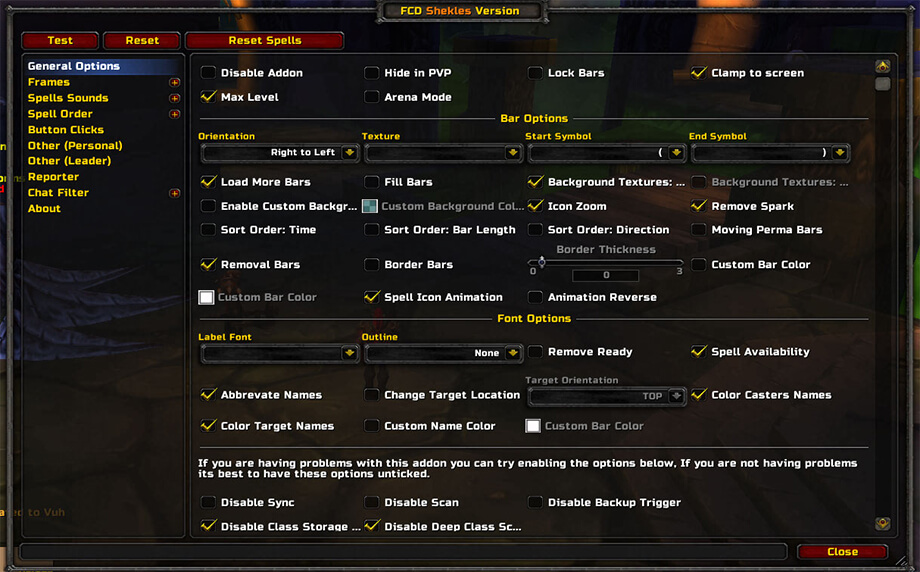
Enable relevant class modules and cooldown categories, then place the bar where the group can read it. It reports only abilities defined by modules and received from compatible clients; FCD_DB stores settings.
Raid cooldown display
Enable the class modules and cooldown categories needed by the group, then place the bar where the raid can read it. FatCooldowns reports abilities defined by its modules and information received from compatible clients; it cannot show an undefined custom spell. Talent-query and shared-media libraries support the Interface 30300 package, whose settings are stored in FCD_DB. Missing data can indicate a disabled module or an incompatible client. Test one class cooldown before configuring the complete bar.
How the raid bar is populated
FatCooldowns combines class modules, talent queries, shared-media resources, and bar libraries. Enable the class definitions that are present in the raid and select the cooldown categories the group actually wants to see. Place the resulting bar where healers or raid leaders can read it, then trigger one known ability to confirm that the sender and receiver are using compatible modules.
The bar is a report from the bundled ability tables and compatible clients. A missing cooldown does not prove that the class lacks the ability: the module may be disabled, the ability may not be defined in this old release, or the other client may not be transmitting the expected data. FCD_DB stores the configuration, so changing the bar position or enabled categories persists between sessions.
For a defensive raid workflow, enable the major class cooldown modules, hide categories the group does not use, and verify the first real report before depending on the bar during a boss attempt. This Interface 30300 package should not be judged by modern retail cooldown coverage.