
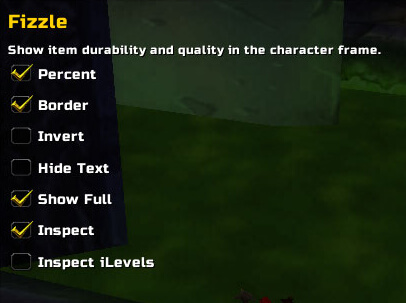
Fizzle v1.5.1 adds item durability and quality information to character and inspection frames. Its Interface 30300 TOC stores FizzleDB per character and lists Ace3 and Voyeur as optional dependencies. It is an equipment overlay, not repair automation or gear score.
Using it
Open the character frame to read the added equipment cues, or inspect another character when the client supplies inspection data.
Equipment information
Fizzle adds durability and item-quality cues to character and inspection frames. Open the character frame or inspect another character when the client supplies inspection data. It is an equipment overlay, not repair automation and not a gear-score calculator. Incomplete or delayed inspection data can leave a frame without the expected values. The supplied release is v1.5.1 for Interface 30300, with Ace3 and Voyeur listed as optional dependencies and FizzleDB saved per character.
Reading the equipment cues
Fizzle adds information directly to the character and inspection frames. On the character panel, look at the equipment slots for the durability and quality cues supplied by the current item data. When inspecting another player, wait for the inspection result before judging the overlay; the client may not have received every item yet. This makes Fizzle useful for a quick equipment check without opening a separate gear database.
The addon does not repair an item, rank a character, or compute a gear score. It is also not a replacement for the Blizzard inspection API: if the target cannot be inspected or the server returns incomplete information, Fizzle has nothing reliable to decorate. Its saved variable is per character, and the TOC identifies v1.5.1 for Interface 30300 with Ace3 and Voyeur as optional dependencies.
For a practical check, open your character frame after a durability loss, then inspect a party member whose equipment you know. Compare the displayed cues with the normal item tooltip. If the overlay is missing, verify that Fizzle is enabled and that optional libraries from the supplied archive were not removed.



