
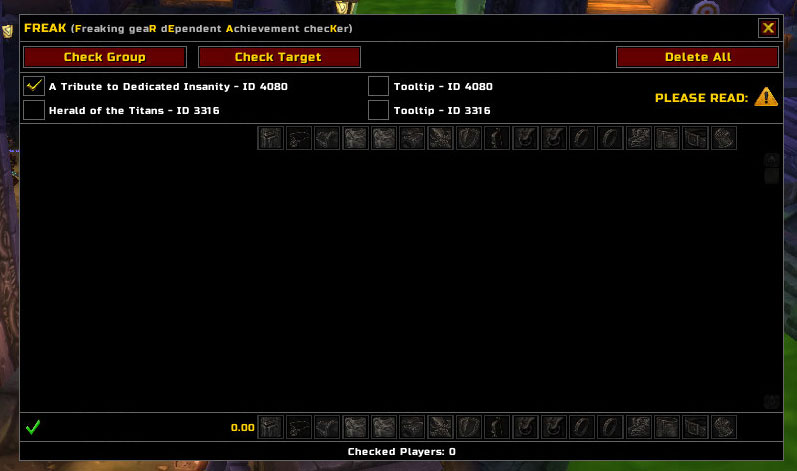
The production archive is FREAK version 30300-5 by kunda with Interface 30300. FREAK means Freaking geaR dEpendent Achievement checKer : it checks gear against the restrictions used by two specific WotLK achievements, A Tribute to Dedicated Insanity (4080) and Herald of the Titans (3316). It is not a general item-level monitor or a complete raid eligibility system.
What it checks
FREAK uses the built-in gear data and item-level rules for the selected achievement. For A Tribute to Dedicated Insanity it accepts gear below item level 245 and a bundled list of allowed exceptions. For Herald of the Titans it applies the build's item-level and weapon-slot rules for that achievement. The main frame lists each scanned player, average item level and the equipment slots; every slot is marked valid or not valid, and the player receives an overall pass/fail result.
The check is based on inspectable item information. FREAK can scan the player, the current target or the current party/raid through the main GUI. Players outside inspect range are shown as unavailable rather than silently treated as valid. The source explicitly warns that item links do not carry gem and enchantment data, so this is only a gear-screening aid and cannot guarantee achievement eligibility.
Interface and workflow
Open the GUI with /freak, through the FREAK entry in Interface Options, or through its optional LibDataBroker launcher. Select the achievement, assemble or target the character to check, and press Check Group or Check Target. The scan proceeds through WoW Inspect data and then displays the results; changed gear can be checked again. Individual rows can be removed, or Delete All can clear the current scan list.
Two optional tooltip checkboxes add a FREAK VALID or NOT VALID line to item tooltips for achievement 4080, achievement 3316, or both. These checks use the same item validation logic and are disabled by default. The main frame can be moved and resized, with its position saved in FREAK_Options.
Limitations and installation
FREAK contains no modern achievement support, class-specific rule set, automatic raid enforcement or inspection of gems and enchants. Its bundled rules are tied to these two 3.3.5-era achievements and the item data shipped in version 30300-5. Install the supplied FREAK folder under World of Warcraft\\Interface\\AddOns; the archive contains the localization files and gear-data module required by the addon.



