
The production archive is GearScore 3.1.20b - Release by Mirrikat45. Its main TOC is marked Interface 40000 and lists BonusScanner as a required dependency; the archive includes BonusScanner and the bundled WotLK-era item data. This exact package is the source used on the site, but the Interface 40000 marker does not by itself guarantee native compatibility with a 3.3.5a client.
What the score represents
GearScore calculates a numeric summary from equipped items. The code evaluates item level and quality together with slot modifiers and the item's place in the character's equipment; it also records an average item level separately. The result is a gear metric, not a measurement of rotation, mechanics, class knowledge, gems, enchants, uptime or raid performance. A higher number only describes the equipment according to this build's algorithm.
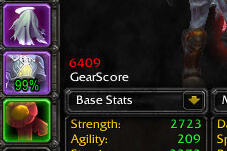
The addon calculates a score for the player and can inspect a target or mouseover when the WoW Inspect API allows it. Its character view can show the overall GearScore, average item level, date and stored equipment details. The tooltip integration can add another player's score and average item level, compare that score with the player's own value, and optionally list per-item scores and item levels. These displays are controlled by the addon settings rather than by GearScoreLite or Pawn.
Cache, database and practical use
GearScore stores records in the realm-based GS_Data saved variable. A record can contain a character's score, average item level, equipment links, class, level, guild, location, scan date and source. With Communication enabled, the addon exchanges GearScore records through its own addon messages in guild or group contexts and can show cached entries in a sortable database. This is addon-protocol sharing, not account-wide or external database synchronization; records can also become stale and should be treated as a snapshot.
To check a player, target or mouseover the character and use the inspect/display view, or open the profile with /gs. The supplied commands include /gscan and /gsearch for the display view, /gearscore as an alias, /gset for settings, /gspam for group score reports, and /gsban for the communication ban list. Options control player and item scores, average item levels, dates, detailed tooltip lines, comparisons, chat scores, communication and database behavior.
Installation and limits
Install both supplied folders, GearScore and its required BonusScanner, under World of Warcraft\\Interface\\AddOns. GearScore does not decide whether a player is ready for a raid and does not replace inspecting the actual character, build, gems, enchants or performance.



