
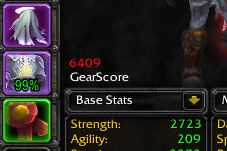
GearScoreLite is a lightweight gear-score display addon for quickly summarizing a character's equipped item level and gear value.
Main features
- GearScore-style value for characters.
- inspect support.
- tooltips or character-frame display depending on build.
- smaller feature set than full GearScore packages.
How to use
Inspect yourself or another player and use the score only as a quick gear snapshot. It does not replace checking enchants, gems, hit caps, talents or encounter experience.
Practical tip
Configure the addon around decisions you actually make during play. A small, readable setup is usually more useful than enabling every optional alert, panel or statistic. After changing settings, reload the UI if the build requires it and verify that the information remains visible at your normal resolution and UI scale.
Inspecting a gear score
GearScoreLite 3x04 reads the inspected or linked equipment of a character and produces a compact gear-level estimate. The Interface 30300 package saves its options in GS_Settings. Its purpose is quick comparison of item level and equipment quality, not a complete evaluation of a player’s skill, gems, enchants, rotation or encounter performance.
Use the score when looking at a player in the inspect window or when an item link supplies enough equipment data for the addon to process it. Compare the result with the actual item distribution: a high score can include pieces that are inappropriate for a class or specialization, while a lower score can reflect a useful resistance or set item. GearScoreLite is therefore best used as a sorting signal for a raid group, not as an automatic admission rule. The package is the WotLK 3.3.5 build and should not be confused with later GearScore forks that changed the formula or display.
Because the score is assembled from equipped items, inspect data may arrive in stages. Wait for the inspection to finish before comparing a result, and treat missing item data as incomplete rather than as a zero-quality judgment. The saved settings control the display; they do not turn the score into a class-aware upgrade calculator.



