GladiusEx is an arena unit-frame addon for the WotLK 3.3.5a client. The archive's GladiusEx.toc targets interface 30300 and includes its own arena and party frame code, Ace3-based options, and the modules shipped in this package. It adds a dedicated frame for each detected arena unit instead of relying only on the small default Blizzard arena display.
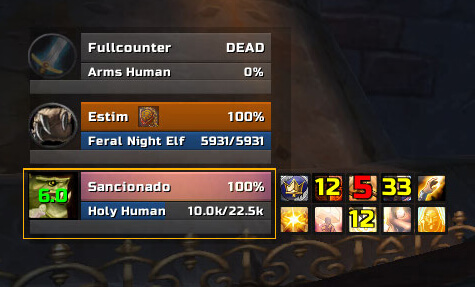
What the arena frames show
The base frame system identifies arena units and creates a separate group for the enemy team. The included HealthBar and PowerBar modules display current health and power, while ClassIcon identifies the class and can show important auras with an icon and cooldown spiral. The bundled spec list and aura scanning can add class or specialization context when the client has enough information to identify it; it is not an infallible source of hidden enemy data.
CastBar displays an enemy cast with an icon, text and timing information. The build also includes a not-interruptible colour/shield option and an Interrupts module that shows an interrupt duration over the enemy class icon after an interrupt event. TargetBar and PetBar can add the relevant target or pet information to the frame when those modules are enabled.
DR, trinket and cooldown information
DRTracker uses the bundled DRData-1.0 library and places diminishing-return icons beside the frame. Its options include icon size, spacing, attachment point and a cooldown spiral. The exact categories are controlled by the build's DR data; this page does not assume a modern DR list that is not present in that library.
The Cooldowns module uses the included LibCooldownTracker-1.0 data and tracks the supported class, racial and item cooldown entries, including the PvP trinket category. Cooldown icons can be grouped, detached and displayed with a cooldown spiral, so an arena player can see whether an important enemy defensive or escape ability is available. The list is limited to spells and items known to this archive and should not be read as a complete database of every ability in later WoW versions.
The Auras and Alerts modules add another decision layer. Important enemy auras can be shown on the class icon, and configured aura or cast conditions can trigger the alert display. Announcements is a separate module for configured arena messages such as drinking, low health and selected spell events; its destination and toggles are configurable. It does not perform actions for the player and does not replace normal targeting or interrupt keybinds.
Click actions and practical arena use
The Clicks module creates secure click areas over the frames. In the supplied defaults, left click targets the unit and right click focuses it; the options also expose target, focus, spell and macro actions. This lets a player select an enemy or establish a focus directly from the GladiusEx frame without first finding the unit in the default arena list. Protected actions still follow the WoW secure-action rules.
A practical workflow is to keep the enemy frames near the centre of the combat UI, use the cast bar to react to an interruptible spell, and watch the DR icon after crowd control has been applied. When a trinket or tracked cooldown is consumed, the icon state helps decide whether to pressure that target or hold the next control effect. A healer or support player can use the health/power bars and class icon to identify which enemy is vulnerable while keeping target and focus clicks consistent.
Configuration, profiles and test mode
Open the options with /gladiusex or its alias /gex. The options tree contains separate arena and party settings, module enable/disable controls, frame size and position, bar textures and colours, icon placement, alert appearance, cooldown groups, click actions and profile controls. The package uses AceDB profiles and includes dual-spec support through its optional library. Arena and party settings can be copied between groups or reset independently.
Before entering a rated match, use the built-in frame test: /gex test or /gex test 2, /gex test 3 or /gex test 5. This displays sample units so frame size, spacing, module visibility and click placement can be checked without waiting for an arena queue. Stop testing from the options panel or by using the corresponding test control.
Included libraries and limitations
The archive embeds Ace3, DRData-1.0, LibCooldownTracker-1.0, LibDispellable-1.0, LibRangeCheck-2.0, LibSharedMedia-3.0 and related support libraries. Clique and ButtonFacade are listed as optional dependencies, not as a guarantee that every integration is installed or configured. The build only knows the spells, auras, cooldowns and arena data shipped with its interface-30300 package. Enemy information may also depend on what the WotLK client exposes during the match, so spec, aura and cooldown indicators can be incomplete.
Installation
- Close WoW and remove an older GladiusEx folder before installing this archive.
- Extract the supplied
GladiusExfolder intoInterface/AddOns/. - Enable GladiusEx at character selection, then run
/gex test 2to verify the frames and chosen modules.