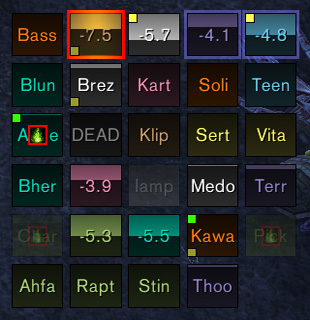
Grid2 r733 is a modular party and raid unit-frame system for Interface 30300. Its modules cover health, power, auras, threat, range, combat, raid debuffs, shields, resurrection and indicators rendered as icons, bars, borders, colors or text. Ace3 and Clique are optional.
Using it
Start with the default layout, add statuses needed by the role, and assign each to an indicator. Grid2's output depends on enabled modules and configuration.
Statuses and indicators
Start with the default layout, add statuses for health, power, aura, threat, range, combat, raid debuffs, shields, or resurrection, and assign each status to an icon, bar, border, colour, or text indicator. Optional modules decide which statuses exist. Clique integration is optional for click-casting. The supplied r733 Interface 30300 package should be configured with its own modules; modern Grid2 profiles are not assumed compatible. Test the layout in a party before using it in a raid.
From statuses to indicators
Grid2 separates the data source from the place where it is drawn. A status can represent health, power, an aura, threat, range, combat state, a raid debuff, a shield, or resurrection information. An indicator then renders that status as an icon, bar, border, colour, or text. Adding a status alone does not make it visible: assign it to an indicator and put that indicator on the relevant unit frame.
Start with the default layout and create one role-specific change. A healer can assign dispellable debuffs to an icon and incoming heals to a bar; a raid leader can add range and combat status; a tank can add threat and target indicators. Check the result on party units before adding raid-wide modules. Optional modules and the optional Clique integration must be enabled for their statuses to exist.
Grid2 r733 targets Interface 30300. Its modular design means an empty indicator can be a configuration issue or simply a missing module, not necessarily a broken frame. Keep the core, selected status modules, and optional libraries from the same archive.