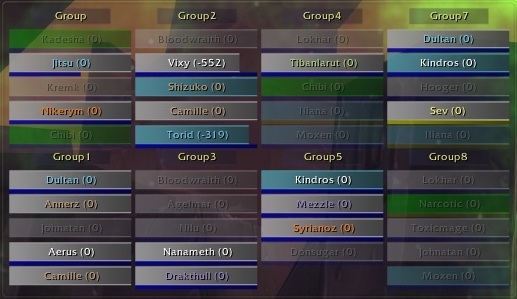
HealBot is a healing raid-frame addon that combines customizable unit frames with click-casting and dispel support.
Main features
- party and raid health frames.
- click-cast spell bindings.
- debuff highlighting and cleansing support.
- HoT or buff indicators depending on class and build.
How to use
Configure your healing clicks before joining a raid, then test every modifier on a friendly target so emergency spells cannot be miscast.
HealBot 3.3.5.4
HealBot 3.3.5.4 provides skinable raid bars for healing, decursing, buffing, resurrecting, range checking and aggro tracking. The archive includes LibHealComm-4.0, LibQuickHealth-2.0 and talent-query support and stores configuration in HealBot_Config and Healbot_Config_Skins. Open the HealBot options, create or select a skin, choose the unit groups and assign a mouse button or modifier to a real heal, dispel, buff or resurrection spell.
Configure bars for the raid role, then test a heal on a party frame, a removable debuff and an out-of-range unit. During combat, click the unit bar rather than changing target first; the assigned spell is sent to that unit if the secure binding, range and resource conditions allow it. Save a profile for each healer role and keep the debuff and aggro indicators visible enough to act on them.
Configure a skin, select the raid groups, assign a heal and a cleanse, then test a party frame at normal and out-of-range distance. Add aggro, range and debuff indicators only after the basic click-heal path is reliable. HealBot 3.3.5.4 uses the supplied LibHealComm and QuickHealth integrations.
Build the healer profile around the actual raid size, then add click assignments for heal, cleanse and resurrection. Test normal range, out-of-range and missing-debuff states so the bar color has a clear meaning.
HealBot skins control which groups and indicators are visible, while click assignments control what happens when a bar is clicked. Keep those concepts separate: first make the raid bars readable, then assign heal, cleanse and resurrection actions. LibHealComm can provide incoming-heal information when the library and sender support it, but an absent prediction is not evidence that the target has no incoming heal.