
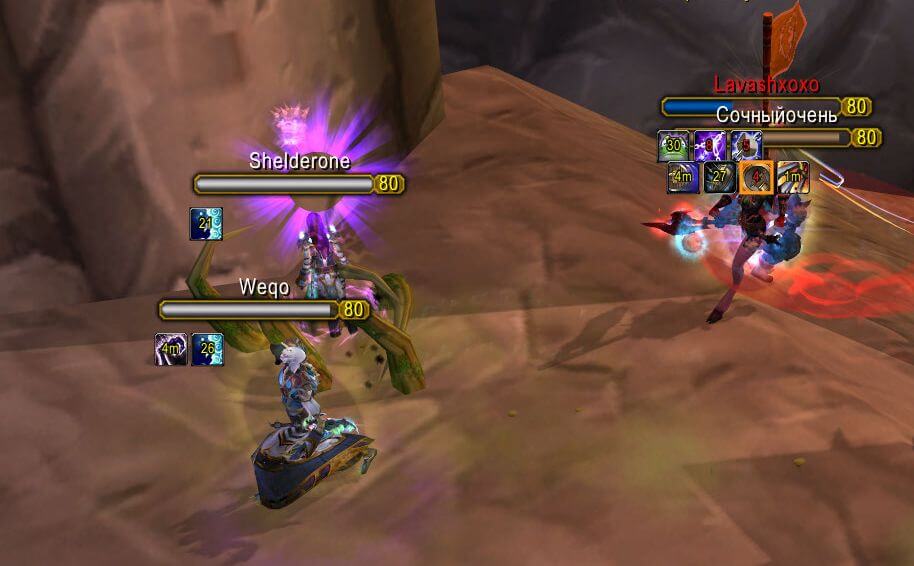
Icicle is a PvP nameplate addon that shows important enemy cooldown icons directly above or near nameplates.
Main features
- enemy cooldown icons on nameplates.
- cooldown timers for tracked abilities.
- useful visibility for interrupts, defensives and crowd control in PvP.
- custom spell lists or display controls in supported builds.
How to use
Enable enemy nameplates, then enter PvP combat. Icicle reacts when tracked enemy abilities are used and places their cooldown information near the plate.
Practical tip
Configure the addon around decisions you actually make during play. A small, readable setup is usually more useful than enabling every optional alert, panel or statistic. After changing settings, reload the UI if the build requires it and verify that the information remains visible at your normal resolution and UI scale.
Enemy cooldown icons
Icicle 0.1 tracks selected enemy PvP cooldowns and displays their remaining timers near the relevant unit information. The Interface 30300 package stores its data in Icicledb. It is intended for arena or battleground awareness: the player can see that an opposing class has recently used a major defensive, interrupt or control ability.
Configure the tracked spell list and place the icons where they do not cover the unit frame. During a match, watch the icon state before committing a stun, silence or burst window; a visible cooldown means the ability was observed recently, not that the opponent is currently in range or has no alternative. Combat-log visibility and the opponent being in range affect what can be tracked. Icicle is a small WotLK-era monitor, not a complete modern arena unit-frame system.
Use the icons to decide whether to commit control, not to predict the opponent’s entire defensive plan. A timer represents observed use and may be affected by range or combat-log visibility. The compact display is suited to a PvP focus area; it is not a replacement for a target frame or a complete arena cooldown database.



