
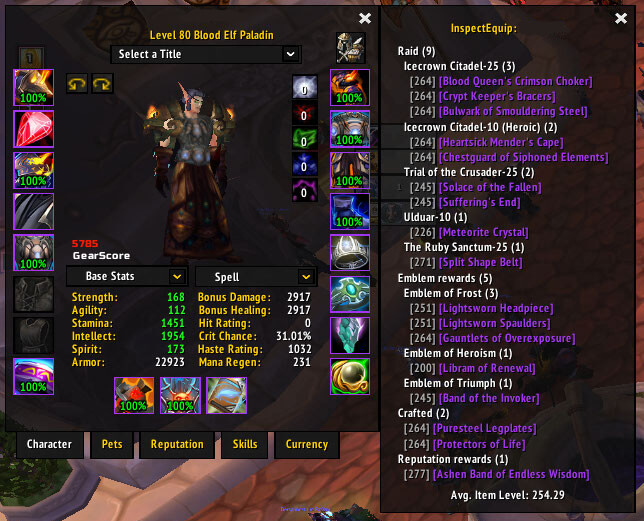
InspectEquip is an inspect-window enhancement that groups another character's equipment by source and adds acquisition details to item tooltips. It is useful when you want this information or control available inside the game without adding an unnecessarily large UI package. The goal is to make a specific WotLK 3.3.5a task quicker and easier to read while leaving the rest of the interface largely unchanged.
Main features
- gear source overview.
- raid, boss, vendor or reputation information.
- extra item tooltip details.
- average item-level information in some builds.
How to use
Inspect a player and review the source panel as a quick gear overview. Use the tooltip details to identify where unfamiliar items can be obtained.
The archive does not register a slash command. Configure InspectEquip through Interface > AddOns > InspectEquip, where the verified options control tooltip source lines, the inspect and character panels, unknown items, missing-enchant warnings, item levels, average item level, and tooltip text color.
Installation
- Download the addon archive for your WotLK 3.3.5a client.
- Close World of Warcraft before replacing addon files.
- Extract the addon folder into World of Warcraft\Interface\AddOns.
- Start the game and make sure the addon is enabled on the character-selection screen.
- Test its basic function in a safe situation before using it in a raid, arena, Auction House session, or other important activity.
If InspectEquip does not appear to work, first check for an extra nested folder inside AddOns and confirm that you downloaded a build intended for the 3.3.5a API. Old WotLK addons often have several forks, so commands and optional modules can differ slightly between packages. Keep a backup of a working addon folder before replacing it with another fork.
Compatibility and troubleshooting
WotLK 3.3.5a resources often exist in several forks. If a command, trigger or option behaves differently, confirm the exact archive hosted on the page before changing the instructions. When testing, disable unrelated addons if necessary, reload the UI after configuration changes, and keep a working backup so you can return to the previous setup quickly.



