
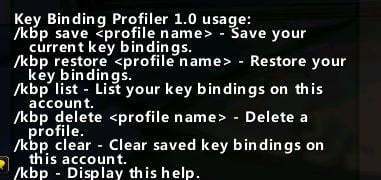
Key Bindings Profiler is a small addon for saving and restoring named key-binding profiles on the same account.
Main features
- save the current keybind layout under a profile name.
- restore a previously saved binding profile.
- list and delete saved profiles.
- clear the saved profile data.
How to use
Save a known-good profile before experimenting. The original addon warns that bindings made directly to spells, items or macros may not restore safely, so test on a non-critical setup first.
Profiles for key bindings
KeyBindingsProfiler stores named key-binding profiles in saved_keybindings and binding profiles. Create a profile while the current key assignments are active, give it a role-specific name, and switch profiles when the character changes from a raid layout to a PvP or alternate-character layout.
Apply a profile before combat and verify keys that depend on action-bar paging, modifiers or class abilities. The profiler restores binding data; it does not create an unknown spell, repair a macro body or override secure combat restrictions. Keep one known-good profile for recovery and update the named profile after deliberately changing a binding.
Before switching profiles, record which action-bar page and modifier state is active. This avoids believing a profile is broken when the same key is intentionally bound differently on another bar.
Profiles are snapshots, not a live synchronization service. After loading one, press the important keys on the current bar page and confirm that modifier and stance bindings match the intended character role.
Do not overwrite a working profile while experimenting. Save a second named profile, test it on the intended action-bar pages, and return to the known-good profile if a modifier or stance binding behaves unexpectedly.



