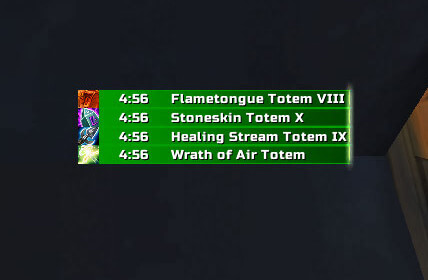
This archive contains Koko Totem Timers version 30300.1.1 for the WotLK 3.3.5a client (Interface 30300). The addon is enabled only for Shamans and watches the four active totem slots returned by the game API: Fire, Earth, Water and Air. It draws timer bars for the totems that are currently placed and removes a bar when the totem expires, is destroyed or is cleared by Totemic Recall.
Totem bar
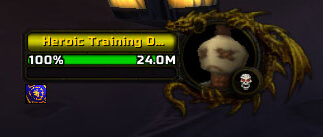
Each active totem is represented by its icon and a remaining-duration bar. The display is not a database of every Shaman spell and it does not cast replacement totems for the player. It reflects the current slot state supplied by GetTotemInfo, so it is useful for seeing which elemental slot is still active during an encounter and which slot needs attention after a replacement or a totem loss.
The source supports a separate Totem Tick Bar for the periodic ticks of Tremor Totem, Cleansing Totem and Magma Totem. The three tick displays can be enabled independently. The default configuration enables Tremor and Cleansing ticks and leaves Magma ticks disabled, but each option can be changed. This bar is a timing aid for those specific totems; it is not a general cooldown tracker.
Expired and destroyed totems
Koko TotemTimers reacts to the WotLK PLAYER_TOTEM_UPDATE event. When a slot has a duration, the addon registers its timer; when the API reports no active duration, it unregisters the bar and removes the matching tick display. This makes a missing bar meaningful: the totem is no longer reported as active, so the Shaman can decide whether to recast it.
The Announce option adds a notification when a previously tracked totem is destroyed or disappears. With no party members it prints the message locally; with party members it sends the destruction message to the party channel. This is a simple death announcement, not a raid-wide warning system, and it does not announce every normal expiration as a tactical recommendation.
Using it during play
Before a dungeon or raid pull, place the totems you intend to use and check that four bars appear in the expected positions. During the fight, use the Totem Bar to see the remaining duration of each elemental slot and the Tick Bar to anticipate the next Tremor, Cleansing or Magma tick when that option is enabled. If an encounter removes a totem, the corresponding bar disappears and the optional announcement identifies the lost totem, giving you a direct cue to replace it.
For a simpler interface, keep the ordinary Totem Bar enabled and turn off tick displays that are not relevant to your role. For a timing-focused setup, place the Tick Bar separately so it can be read without covering the main totem timers. The addon does not provide a multi-totem cast button, a preset totem set system, weapon-imbue timers, shield tracking, range indicators or click-casting in this source, so those tasks still require the normal game UI or another addon.
Settings and commands
Open the configuration with /ktt. The options include enabling or disabling Koko Totem Timers, showing movable anchors, enabling the destruction announcement, and resetting settings. The Totem Bar and Totem Tick Bar each have independent scale, width and texture settings. Their anchors can be moved on screen, and the chosen positions are saved in the Koko_TotemTimersDB profile. The package embeds Ace3 and uses its configuration and profile storage; no additional Shaman addon is required by the archive.
The available textures are bundled with this build, including Default, Bantobar, Charcoal, Glaze, Otravi, Pearl, Smooth, Smudge and Striped. The Tick Bar can be shown separately, placed with the Totem Bar, or disabled. If the timers overlap another frame, enable the anchors, move the relevant bar, then hide the anchors again.
Installation and version limits
Close the game, extract the top-level Koko_TotemTimers folder directly into Interface\AddOns, enable it for the Shaman character, and type /ktt. This is an Interface 30300 build, so its timers depend on the WotLK 3.3.5a totem API and the spell names checked by this package. It tracks the player's four active totem slots; it does not inspect other Shamans' totems or infer missing raid buffs. If no bars appear, first confirm that the addon is enabled on a Shaman and that the folder is not nested inside another directory.