KRU is Kader's Raid Utilities, a modular raid-leader package. The supplied archive is version 1.0.0, marked for Interface 30300. It creates several small, configurable UI frames and raid controls instead of replacing the whole interface. The included modules are loaded from the same KRU folder and use bundled Ace3, LibBars, LibGroupTalents, LibSharedMedia and supporting libraries.
What KRU provides
- Raid Menu: a movable control panel for raid leaders/officers or party leaders. It can open the Blizzard raid menu, start a ready check, toggle the target's main tank/main assist assignment, disband the group after confirmation, and convert a party to a raid while setting master loot.
- Loot: separate party and raid loot settings. The module can apply a selected loot method and threshold when the character is party or raid leader.
- Auto Invites: guild-based quick invites for maximum-level members or guild members in the same zone, whisper keyword invites, guild-only keyword invites, and invites for a selected guild rank and higher. Rank invites announce the action in guild/officer chat and wait before inviting. The module checks group capacity and can queue invites while a party is being converted.
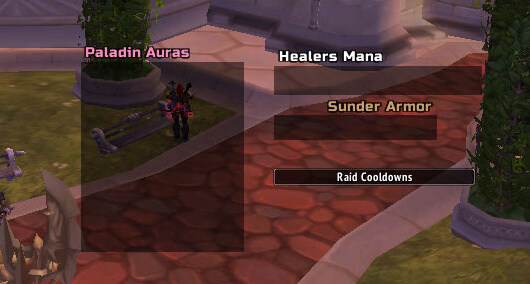
- Paladin Auras: a frame showing tracked Paladin aura coverage for group members. Its configuration includes the aura frame, icons, update frequency and appearance.
- Healers Mana: a group/raid display for recognized healer units, updated from roster, talent, mana and aura events. The frame can be moved, locked, scaled and formatted.
- Raid Cooldowns: combat-log-based bars for configured class abilities used by group members. Bars can show spell icons and duration, with options for class colors, selected spells, size, spacing, orientation and which spells are shown.
- Sunder counter: counts Sunder Armor casts detected from friendly party or raid members and displays the count by player. It can reset, lock/unlock, and report the current counts to party or raid chat.
- Combat Timer: a small timer tied to entering and leaving combat. It can also trigger the Blizzard stopwatch and has independent font, color, scale and lock settings.
Commands and workflow
Use /kru or /raidutilities to open the main configuration. Module-specific commands are /auras, /mana, /rcd, /loot and /invites. The invites command accepts /invites guild and /invites zone; without those arguments it opens the invite settings. Sunder uses /sunder reset, /sunder report, /sunder lock and /sunder unlock; plain /sunder opens its options.
A practical raid workflow is to open the KRU menu before forming the group, configure loot and the modules relevant to the encounter, then use the ready check, role controls, cooldown bars, healer-mana frame or Sunder counter during the run. Enable keyword invites only when you want matching whispers to invite players automatically; the guild and rank functions require guild data and appropriate group-leader permissions.
Installation and limits
Install the supplied KRU folder in Interface\AddOns. The archive includes its libraries and modules. This build is a WotLK 3.3.5a-era raid utility suite: it depends on Blizzard party/raid APIs and combat-log events, and its class, spell and talent recognition is limited to the data implemented in the included modules. It is not a general threat meter, damage meter or replacement for every raid-management tool.