
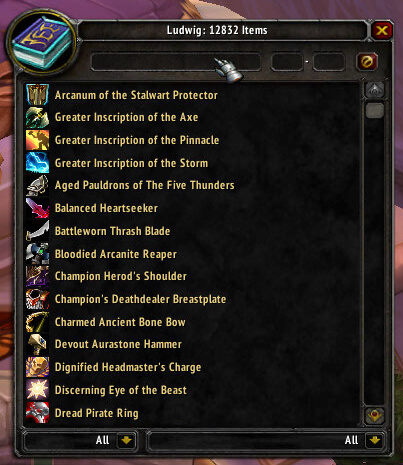
Ludwig is an in-game item database and search tool for finding item links without leaving World of Warcraft.
Main features
- search items by name.
- browse item properties.
- generate item links in chat.
- lookup by item ID in supported builds.
How to use
Open /lw or search from chat, then Shift-click or insert the resulting item link wherever you need it.
Practical tip
Configure the addon around decisions you actually make during play. A small, readable setup is usually more useful than enabling every optional alert, panel or statistic. After changing settings, reload the UI if the build requires it and verify that the information remains visible at your normal resolution and UI scale.
Searching the item database
Ludwig 1.8.7 is a local item database and search interface. The Interface 30300 package includes the Ludwig core and linkerator code, which lets the addon resolve item links and connect search results with the item information known to the client. It is useful when a player remembers part of an item name or wants to inspect a source without opening an auction house.
Open the Ludwig search window, enter an item name or link, and inspect the matching entries and their stored information. Use the result to compare item names, identify an item from a chat link or locate a database record before asking where it drops. The database is limited to the records shipped with this WotLK package and does not query a live website. An item absent from the local data cannot be recovered by changing the search spelling, and later Retail item IDs should not be assumed to exist.
Ludwig’s linkerator support is useful when an item arrives as a chat link: click or search the link, then inspect the local record instead of manually copying an item ID. The result remains a local database record, so it may show no source for a custom-server item or an item introduced after the archive was built.



