
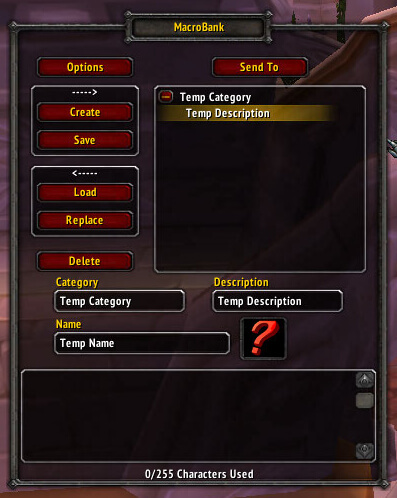
MacroBank is a macro-storage addon that keeps extra macros in named groups outside the normal character and account macro limits. It is useful when you want this information or control available inside the game without adding an unnecessarily large UI package. The goal is to make a specific WotLK 3.3.5a task quicker and easier to read while leaving the rest of the interface largely unchanged.
Main features
- store macros in addon-managed groups.
- copy macros into or out of the Blizzard macro panel.
- organize utility or class-specific macro sets.
- useful for players who maintain many alternate setups.
How to use
Store rarely used macros in MacroBank and copy only the current set into the normal macro slots. Verify each copied macro after changing talents or keybinds.
The archived package does not register a slash command. Open MacroBank through the Blizzard Interface > AddOns options; its Ace3 configuration covers category creation, loading, login and talent-swap behavior, macro defaults, and the character/account groups used for automatic loading.
Installation
- Download the addon archive for your WotLK 3.3.5a client.
- Close World of Warcraft before replacing addon files.
- Extract the addon folder into World of Warcraft\Interface\AddOns.
- Start the game and make sure the addon is enabled on the character-selection screen.
- Test its basic function in a safe situation before using it in a raid, arena, Auction House session, or other important activity.
If MacroBank does not appear to work, first check for an extra nested folder inside AddOns and confirm that you downloaded a build intended for the 3.3.5a API. Old WotLK addons often have several forks, so commands and optional modules can differ slightly between packages. Keep a backup of a working addon folder before replacing it with another fork.



