
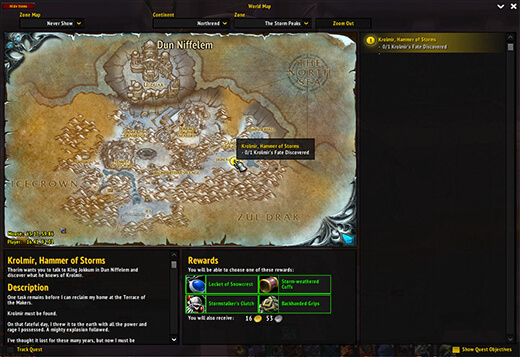
Mapster is a lightweight world map enhancement addon for WoW WotLK 3.3.5a. It improves the default Blizzard map without replacing it with a large navigation or questing system.
It is useful for players who want coordinates, better map scaling, and additional control over the world map while keeping the interface close to the original WoW UI.
Main features
Mapster includes several useful map improvements:
- Adjustable map scale and transparency
- Player and cursor coordinates
- Optional fog-of-war removal
- Improved party and raid icons
- Instance map support
- Additional world map display options
Most features can be enabled or disabled individually, so you can keep only the parts of Mapster that you actually use.
How to configure Mapster
Open the world map and use the Mapster configuration button to access its settings.
You can also open the configuration with:
/mapster
From there you can adjust the map size, coordinates, fog-of-war behavior, and other available options.
Mapster works by modifying the standard Blizzard world map rather than replacing it entirely, making it suitable for players who prefer a simple interface.
Installation
- Download the Mapster archive.
- Close World of Warcraft.
- Extract the addon into World of Warcraft\Interface\AddOns.
- Start the game and make sure Mapster is enabled in the AddOns menu.
If the map remains unchanged, verify that Mapster is enabled and that its folder was extracted directly into the AddOns directory.
Mapster is a simple option for improving the default WotLK world map without adding the larger feature set found in full map replacement addons.
Before you install
Keep a copy of your current addon folder and saved settings before replacing files. Confirm that the extracted folder is intended for the 3.3.5a client, enable it on the character-selection screen, and test the main feature outside important group content. If the interface behaves unexpectedly, disable unrelated addons temporarily and reload the UI.



